


Images






$130.00
Free Shipping
Part #: C9408A Original
Status: In Stock

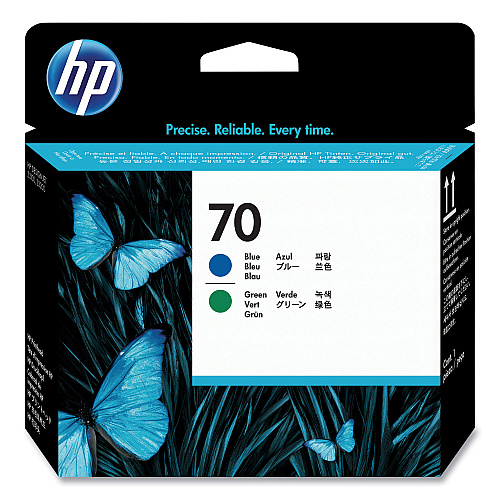
You can enjoy sharp text, graphics, and other high quality printing with the HP C9408A Blue and Green Printhead. Designed and constructed to HP's quality standards, this ink cartridge is an indispensible printing supply that helps to keep your projects on time and on track. Having a spare on hand will help to ensure that your office stays efficient and productive.
HP 70 Blue and Green Printhead
$130.00
Free Shipping
Part #: C9408A Original
Status: In Stock

ITEM C9448A
HP C9448A Matte Black Ink CartridgeHP 70 Matte Black Ink Cartridge, 130-ml
$142.00
In Stock
Free Shipping

ITEM C9449A
HP C9449A Photo Black Ink CartridgeHP 70 Photo Black Ink Cartridge, 130-ml
$142.00
In Stock
Free Shipping

ITEM C9390A
HP C9390A Light Cyan Ink CartridgeHP 70 Light Cyan Ink Cartridge, 130-ml
$142.00
In Stock
Free Shipping

ITEM C9451A
HP C9451A Light Gray Ink CartridgeHP 70 Light Gray Ink Cartridge, 130-ml
$142.00
In Stock
Free Shipping

ITEM C9455A
HP C9455A Light Magenta Ink CartridgeHP 70 Light Magenta Ink Cartridge, 130-ml
$142.00
In Stock
Free Shipping

ITEM C9453A
HP C9453A Magenta Ink CartridgeHP 70 Magenta Ink Cartridge, 130-ml
$142.00
In Stock
Free Shipping

ITEM C9454A
HP C9454A Yellow Ink CartridgeHP 70 Yellow Ink Cartridge, 130-ml
$142.00
In Stock
Free Shipping

ITEM C9452A
HP C9452A Cyan Ink CartridgeHP 70 Cyan Ink Cartridge, 130-ml
$142.00
In Stock
Free Shipping

ITEM C9458A
HP C9458A Blue Ink CartridgeHP 70 Blue Ink Cartridge, 130-ml
$142.00
In Stock
Free Shipping

ITEM C9459A
HP C9459A Gloss Enhancer Ink CartridgeHP 70 Gloss Enhancer Ink Cartridge, 130-ml
$106.00
In Stock
Free Shipping

ITEM C9450A
HP C9450A Gray Ink CartridgeHP 70 Gray Ink Cartridge, 130-ml
$142.00
In Stock
Free Shipping

ITEM C9457A
HP C9457A Green Ink CartridgeHP 70 Green Ink Cartridge, 130-ml
$142.00
In Stock
Free Shipping

ITEM CD951A
HP CD951A Chromatic Red Ink CartridgeHP 70 Chromatic Red Ink Cartridge, 130-ml
$142.00
In Stock
Free Shipping

ITEM C9405A
HP C9405A PrintheadsHP 70 Light Magenta and Light Cyan Printhead
$130.00
In Stock
Free Shipping


ITEM C9407A
HP C9407A PrintheadsHP 70 Photo Black and Light Gray Printhead
$130.00
In Stock
Free Shipping

ITEM C9410A
HP C9410A PrintheadsHP 70 Gloss Enhancer and Gray Printhead
$130.00
In Stock
Free Shipping


ITEM CD949A
HP CD949A PrintheadsHP 73 Matte Black and Chromatic Red Printhead
$130.00
In Stock
Free Shipping

ITEM 112000
HP 112000 Multipurpose PaperHPM1120R Multipurpose Ultra White Paper, 96 Brightness, 20lb, 8 1/2 x 11, 500 Sheets/Ream
$10.09
In Stock

ITEM Q8723A
HP Q8723A Everyday Photo PaperEveryday Photo Paper, Glossy, 8-1/2 x 11, 50 Sheets/Pack
$18.07
In Stock
Brand
Category
Model
C9408A
Color(s)
Blue; Green
Device Types
Inkjet Printer
Market Indicator (Cartridge Number)
HP 70
OEM/Compatible
OEM
Post-Consumer Recycled Content Percent
0%
Pre-Consumer Recycled Content Percent
0%
Remanufactured
No
Supply Type
Printhead
Total Recycled Content Percent
0%

Bluedogink is an authorized Boardwalk dealer 
What devices are compatible with the HP C9408A Printhead?
The HP C9408A Printhead is compatible with HP DesignJet T610, T1100, T1120, and Z2100 printer series.
How do I install the HP C9408A Printhead?
To install the HP C9408A Printhead, first turn off your printer and open the printhead access cover. Remove the old printhead and insert the new one into the correct slot, then close the cover and turn the printer back on to complete the installation.
What is the page yield of the HP C9408A Printhead?
The page yield for the HP C9408A Printhead can vary depending on printer settings, print quality, and the type of media used, but it typically offers a long-lasting performance suitable for professional use.
How often should I replace the HP C9408A Printhead?
The replacement frequency of the HP C9408A Printhead depends on your printing volume and the quality of prints required. Regular users should monitor print quality and replace the printhead when colors become inconsistent or if print errors occur.
Can I use non-HP ink with HP C9408A Printhead?
While it is technically possible to use non-HP ink, it is not recommended as it may affect print quality and potentially damage the printhead. Using genuine HP ink ensures optimal performance and reliability.
Why is my HP C9408A Printhead not recognized by the printer?
If your printer does not recognize the HP C9408A Printhead, ensure it is correctly installed, and check for any visible obstructions or damage. Restart the printer and update its firmware if necessary. If issues persist, contact HP support.
How can I maintain the HP C9408A Printhead for optimal performance?
To maintain optimal performance, regularly clean the printhead using the printer's built-in cleaning function, handle it with care to avoid physical damage, and use high-quality ink cartridges to prevent clogging and ensure longevity.

Bluedogink.com is a leading provider of printer, printer supplies, office and paper products.
Our wholesale price on HP C9408A Printheads info is part of our commitment to provide consumers with the lowest discount price available. Our customers are very important to us. We cater to many industries including military, government, schools, educational, medical, corporate, healthcare, legal, accounting, finance and many more. So, act now and buy HP C9408A Printheads at our low price.







Thank you for your interest in this item.
Please note: Once you receive word that this item is available, it's up to you to act! An email notification guarantees neither inventory nor price. But don't worry: should you miss out on the first shipment, you can always request another notification.

your order $99+
Sign up for the best discounts and exclusive offers not advertised anywhere else
your order $99+
Sign up for the best discounts and exclusive offers not advertised anywhere else
 At Checkout
*Get $10 off your order $99+, limit one use per customer, expires in 14 days