





Ads

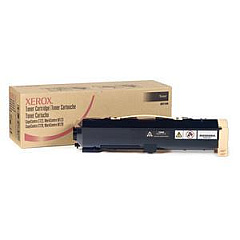
Xerox WorkCentre Pro 123 Black Toner Cartridges

Enhance your office productivity with genuine Xerox WorkCentre Pro 123 Toner Cartridges. These high-quality cartridges are specifically designed for the Xerox WorkCentre Pro 123 multifunction printer, ensuring optimal performance and crisp, professional-quality prints. The Xerox 006R01184 Black Toner Cartridge delivers exceptional page yield and consistent output, making it an economical choice for busy offices. With its advanced formulation, this toner produces sharp text and clear graphics, meeting the demands of various business documents. Xerox WorkCentre Pro 123 Toner Cartridges are easy to install and maintain, minimizing downtime and maximizing efficiency. Trust in Xerox's commitment to quality and reliability to keep your WorkCentre Pro 123 running smoothly. Choose genuine Xerox toner cartridges for uncompromised print quality and device longevity, ensuring your office stays productive and professional.

Xerox WorkCentre Pro 123 Printers Supplies FAQs

  • What is the page yield of the Xerox 006R01184 Black Toner Cartridge?

    The Xerox 006R01184 Black Toner Cartridge typically yields approximately 30,000 pages at 5% coverage.

  • Are these toner cartridges compatible with other Xerox printers?

    No, these toner cartridges are specifically designed for the Xerox WorkCentre Pro 123 and may not be compatible with other models.

  • How long does a Xerox WorkCentre Pro 123 Toner Cartridge typically last?

    The lifespan of a toner cartridge depends on usage, but under normal conditions, it can last several months to a year.

  • Can I use third-party toner cartridges in my Xerox WorkCentre Pro 123?

    While third-party cartridges may work, using genuine Xerox toner cartridges is recommended to ensure optimal performance and print quality.

  • How do I install a new toner cartridge in the Xerox WorkCentre Pro 123?

    To install a new cartridge, open the front cover, remove the old cartridge, and insert the new one until it clicks into place. Close the cover to complete installation.

  • Are these toner cartridges environmentally friendly?

    Yes, Xerox toner cartridges are designed with environmental sustainability in mind and can be recycled through Xerox's Green World Alliance program.

  • What should I do if I experience print quality issues with my Xerox WorkCentre Pro 123?

    First, ensure you're using genuine Xerox toner cartridges. If issues persist, clean the print heads and perform a test print. If problems continue, contact Xerox support.

  • Can I store unused toner cartridges for later use?

    Yes, you can store unused toner cartridges for future use. Keep them in their original packaging in a cool, dry place away from direct sunlight.

  • Does using genuine Xerox toner cartridges affect my printer's warranty?

    Using genuine Xerox toner cartridges helps maintain your printer's warranty. Using third-party cartridges may void the warranty if they cause damage to the printer.

  • How can I tell if my Xerox WorkCentre Pro 123 Toner Cartridge is running low?

    The printer's display panel will show a low toner warning when the cartridge is running low. You can also check toner levels through the printer's software interface.

Warehouse Locations

Policy & Agreement | Copyright © 1995-2026 BlueDogInk.com
