




Ads

Victor Ink JET Calculator Black Ink Cartridges

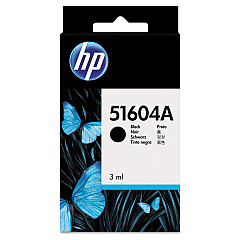
Victor Ink JET Calculator Ink Cartridges are essential for maintaining the performance of your Victor printing calculators. These high-quality cartridges ensure crisp, clear printouts for all your financial calculations and record-keeping needs. Compatible with popular models, these ink cartridges offer reliable performance for businesses, educational institutions, government offices, healthcare facilities, and wholesale operations. Choose from the original HP 51604A Black Ink Cartridge for authentic results or opt for the cost-effective Innovera Remanufactured Black Ink, a replacement for 51604A. Both options deliver consistent, smudge-resistant prints that dry quickly, making them ideal for professional use. By using genuine Victor Ink JET Calculator Ink Cartridges, you can extend the life of your calculator and ensure accurate, legible results every time. Don't let low ink slow down your productivity – stock up on these dependable cartridges today.

Victor Ink JET Calculator Calculators Supplies FAQs

  • What calculators are compatible with Victor Ink JET Calculator Ink Cartridges?

    Victor Ink JET Calculator Ink Cartridges are compatible with various Victor printing calculator models. Check your calculator's manual or the product description for specific compatibility information.

  • How long does a Victor Ink JET Calculator Ink Cartridge typically last?

    The lifespan of a cartridge depends on usage frequency and print volume. On average, a cartridge can last several months with regular use.

  • Is there a difference in quality between HP and Innovera ink cartridges?

    While HP cartridges are original equipment manufacturer (OEM) products, Innovera offers high-quality remanufactured alternatives. Both provide reliable print quality, with Innovera often being more cost-effective.

  • How do I install a new ink cartridge in my Victor calculator?

    Installation is typically simple. Open the calculator's ink compartment, remove the old cartridge, and insert the new one. Refer to your calculator's manual for specific instructions.

  • Can I refill these ink cartridges myself?

    It's not recommended to refill these cartridges yourself. Using new cartridges ensures optimal print quality and prevents potential damage to your calculator.

  • Are Victor Ink JET Calculator Ink Cartridges environmentally friendly?

    Many cartridge manufacturers have recycling programs. The Innovera remanufactured option is particularly eco-friendly as it reuses cartridge components.

  • How should I store unused ink cartridges?

    Store cartridges in a cool, dry place away from direct sunlight. Keep them in their original packaging until ready for use to prevent drying out.

  • What should I do if my prints are fading or streaking?

    Fading or streaking usually indicates a low ink level or a clogged print head. Try cleaning the print head or replacing the cartridge if the issue persists.

  • Can I use non-Victor brand ink cartridges in my Victor calculator?

    While third-party cartridges may work, using Victor-approved cartridges like HP 51604A or Innovera replacements ensures compatibility and optimal performance.

  • How do I know when it's time to replace my ink cartridge?

    Replace the cartridge when prints become faint or incomplete. Some Victor calculators may have low ink indicators to alert you when a replacement is needed.

Warehouse Locations

Policy & Agreement | Copyright © 1995-2026 BlueDogInk.com
