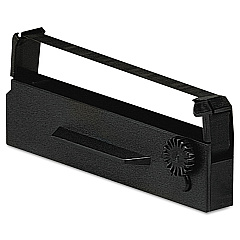





Uniwell TP-620 Retail Equip. POS/Cash Reg. Supplies

Ads

Uniwell TP-620 POS Printer Ribbon

Ensure seamless operations for your retail business with Uniwell TP-620 Retail Equip. POS/Cash Reg. Supplies. This reliable point-of-sale system is essential for efficient transactions and inventory management. Compatible with the Epson ERC-27 Black Ribbon Cartridge, the Uniwell TP-620 delivers crisp, clear receipts and reports. Whether you're running a small boutique or a large retail chain, these supplies are designed to meet your daily operational needs. The durable ribbon cartridge ensures long-lasting performance, reducing downtime and maintenance costs. Invest in quality supplies to keep your Uniwell TP-620 running smoothly, enhancing customer satisfaction and streamlining your business processes. Don't let supply shortages hinder your sales – stock up on these essential POS supplies to maintain peak performance and reliability in your retail environment.

Uniwell TP-620 Retail Equip. POS/Cash Reg. Supplies FAQs

  • What type of ribbon cartridge is compatible with the Uniwell TP-620?

    The Uniwell TP-620 is compatible with the Epson ERC-27 Black Ribbon Cartridge.

  • How often should I replace the ribbon cartridge in my Uniwell TP-620?

    Replacement frequency depends on usage, but typically every 3-6 months or when print quality diminishes.

  • Can I use generic ribbon cartridges with the Uniwell TP-620?

    While generic cartridges may work, it's recommended to use genuine Epson ERC-27 cartridges for optimal performance and longevity.

  • Where can I purchase Uniwell TP-620 supplies?

    You can purchase supplies from authorized Uniwell dealers, office supply stores, or online retailers specializing in POS equipment.

  • Is the Uniwell TP-620 still supported by the manufacturer?

    While the TP-620 may be an older model, supplies and support are still available through various channels.

  • How do I install a new ribbon cartridge in the Uniwell TP-620?

    Open the printer cover, remove the old cartridge, insert the new Epson ERC-27 cartridge, and ensure it clicks into place before closing the cover.

  • What should I do if my Uniwell TP-620 prints become faint or unclear?

    First, try adjusting the print density settings. If that doesn't work, it's likely time to replace the ribbon cartridge.

  • Can the Uniwell TP-620 use thermal paper instead of a ribbon cartridge?

    No, the Uniwell TP-620 is designed to use ribbon cartridges and cannot be converted to use thermal paper.

  • Are there any maintenance tips to prolong the life of my Uniwell TP-620?

    Regularly clean the print head, use high-quality supplies, and avoid exposing the equipment to extreme temperatures or humidity.

  • Is the Uniwell TP-620 compatible with modern POS software?

    While it may work with some systems, compatibility with newer software could be limited. Check with your software provider for specific compatibility information.

Warehouse Locations

Policy & Agreement | Copyright © 1995-2026 BlueDogInk.com
