




Transact POSjet 1000 Retail Equip. POS/Cash Reg. Supplies

Ads

Transact POSjet 1000 Black Ink Cartridges

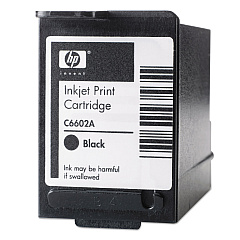
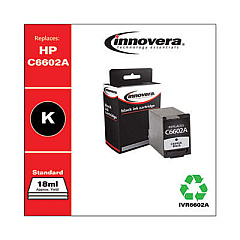
Ensure uninterrupted printing with high-quality Transact POSjet 1000 Ink Cartridges. These reliable cartridges are designed specifically for the Transact POSjet 1000 printer, delivering crisp, clear text and graphics for your point-of-sale receipts and documents. Choose from the original HP C6602A Black Ink Cartridge for optimal performance or opt for the cost-effective Innovera Remanufactured Black Ink, a replacement for C6602A. Both options provide consistent print quality and yield, minimizing downtime and maximizing productivity in busy retail, healthcare, or educational environments. The Transact POSjet 1000 Ink Cartridges are easy to install and maintain, ensuring smooth operations for your business. With these reliable ink solutions, you can count on professional-looking printouts that leave a lasting impression on your customers while keeping your printing costs in check.

Transact POSjet 1000 Retail Equip. POS/Cash Reg. Supplies FAQs

  • What types of ink cartridges are compatible with the Transact POSjet 1000?

    The Transact POSjet 1000 is compatible with HP C6602A Black Ink Cartridge and Innovera Remanufactured Black Ink (replacement for C6602A).

  • How long do Transact POSjet 1000 Ink Cartridges typically last?

    The lifespan of the cartridges depends on usage, but they generally last for several thousand prints.

  • Can I use remanufactured cartridges in my Transact POSjet 1000?

    Yes, you can use remanufactured cartridges like the Innovera Remanufactured Black Ink, which is a replacement for C6602A.

  • How do I install a new ink cartridge in the Transact POSjet 1000?

    To install a new cartridge, open the printer cover, remove the old cartridge, insert the new one, and close the cover. Refer to your printer manual for specific instructions.

  • Are Transact POSjet 1000 Ink Cartridges available in colors other than black?

    No, the Transact POSjet 1000 printer only uses black ink cartridges.

  • How can I tell when my ink cartridge needs to be replaced?

    You may notice faded or incomplete prints. Many printers also have low ink indicators or display messages when cartridges need replacement.

  • Is there a difference in print quality between original HP and remanufactured cartridges?

    While original HP cartridges may offer slightly better quality, many users find remanufactured cartridges provide satisfactory results at a lower cost.

  • Can I recycle my used Transact POSjet 1000 Ink Cartridges?

    Yes, many office supply stores and cartridge manufacturers offer recycling programs for used ink cartridges.

  • How should I store unused ink cartridges?

    Store unused cartridges in a cool, dry place, away from direct sunlight. Keep them in their original packaging until ready for use.

  • What should I do if my printer doesn't recognize the new ink cartridge?

    Try removing and reinserting the cartridge, cleaning the contacts, or updating your printer's firmware. If issues persist, contact the manufacturer's support.

Warehouse Locations

Policy & Agreement | Copyright © 1995-2026 BlueDogInk.com
