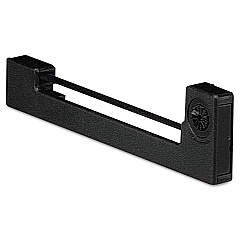





Swintec SW 1260 Retail Equip. POS/Cash Reg. Supplies

Ads

Swintec SW 1260 POS Printer Ribbon

Ensure smooth operations at your point of sale with Swintec SW 1260 Retail Equip. POS/Cash Reg. Supplies. These essential components are designed to keep your Swintec SW 1260 cash register running efficiently, minimizing downtime and maximizing productivity. Compatible with the reliable Epson ERC-09 Black Ribbon Cartridge, these supplies deliver crisp, clear prints for receipts and reports. Whether you're managing a bustling retail store, a busy restaurant, or any other business that relies on accurate transactions, these high-quality supplies are indispensable. They're engineered to meet the demands of high-volume environments, ensuring consistent performance throughout long shifts. By choosing genuine Swintec supplies, you're investing in the longevity and reliability of your POS system. Don't let subpar supplies compromise your operations – trust in Swintec SW 1260 Retail Equip. POS/Cash Reg. Supplies for dependable, professional results.

Swintec SW 1260 Retail Equip. POS/Cash Reg. Supplies FAQs

  • How often should I replace the ribbon cartridge in my Swintec SW 1260?

    The frequency of replacement depends on usage, but typically every 3-6 months for moderate use. Replace when print quality diminishes.

  • Is the Epson ERC-09 Black Ribbon Cartridge compatible with other POS systems?

    While primarily designed for the Swintec SW 1260, it may be compatible with some other systems. Always check your device's specifications before purchasing.

  • How many transactions can I expect from one ribbon cartridge?

    On average, an Epson ERC-09 Black Ribbon Cartridge can handle approximately 4 million characters before needing replacement.

  • Are these supplies covered by a warranty?

    Yes, genuine Swintec supplies typically come with a manufacturer's warranty. Check the product packaging or contact the seller for specific warranty information.

  • Can I use generic ribbon cartridges instead of the Epson ERC-09?

    While generic options may be available, using genuine Epson cartridges ensures optimal performance and prevents potential damage to your POS system.

  • How do I install a new ribbon cartridge in the Swintec SW 1260?

    Consult your Swintec SW 1260 user manual for detailed instructions. Generally, it involves opening the printer compartment, removing the old cartridge, and snapping the new one into place.

  • What other supplies might I need for my Swintec SW 1260?

    In addition to ribbon cartridges, you may need receipt paper, cleaning supplies, and potentially a backup battery, depending on your usage.

  • How can I tell if my ribbon cartridge needs replacement?

    Look for faded or unclear prints on receipts. If text appears light or patchy, it's time to replace the ribbon cartridge.

  • Are these supplies environmentally friendly?

    Epson and Swintec are committed to environmental sustainability. Many of their products are designed with recyclable materials and energy efficiency in mind.

  • Can I buy these supplies in bulk for my business?

    Yes, bulk purchasing options are often available for businesses. Contact the seller or Swintec directly to inquire about bulk pricing and availability.

Warehouse Locations

Policy & Agreement | Copyright © 1995-2026 BlueDogInk.com
