









Ads

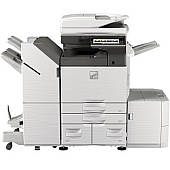
Sharp MX-M3070 Black Toner Cartridges

Sharp MX-M3070 Drum Units

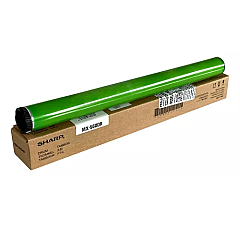
  • Sharp MX560DR Drum

    Item MX560DR

    Sharp MX560DR Drum

    MX-560DR Drum Cartridge; Yield: 300,000 pages..

    Status

    In Stock

    $54.99

Sharp MX-M3070 Copy Paper

Ensure optimal performance for your Sharp MX-M3070 multifunction printer with genuine Sharp MX-M3070 Toner Cartridges. These high-quality consumables are designed to deliver crisp, clear prints and maintain your device's efficiency. The Sharp MX-561NT Black Toner Cartridge offers exceptional yield and consistent output, perfect for high-volume printing environments in businesses, schools, government offices, and healthcare facilities. Paired with the Sharp MX560DR Drum, these supplies work seamlessly to produce professional-grade documents with sharp text and smooth grayscale images. By choosing authentic Sharp toner cartridges, you'll maximize your printer's lifespan and minimize downtime. Whether you're printing reports, forms, or educational materials, these reliable toner cartridges ensure your Sharp MX-M3070 continues to meet your organization's demanding printing needs with uncompromising quality and efficiency.

Sharp MX-M3070 Toner Cartridges FAQs

  • What is the page yield of the Sharp MX-561NT Black Toner Cartridge?

    The Sharp MX-561NT Black Toner Cartridge typically yields around 40,000 pages at 5% coverage.

  • Are these toner cartridges compatible with other Sharp printer models?

    These cartridges are specifically designed for the Sharp MX-M3070 model. Always check your printer's compatibility before purchasing.

  • How often should I replace the Sharp MX560DR Drum?

    The drum unit usually needs replacement after processing about 100,000 pages, but this can vary based on usage patterns.

  • Can I use third-party toner cartridges in my Sharp MX-M3070?

    While third-party cartridges may work, using genuine Sharp toner cartridges ensures optimal print quality and prevents potential damage to your printer.

  • How do I install the new toner cartridge in my Sharp MX-M3070?

    Consult your printer's user manual for specific instructions, but generally, you'll need to open the front panel, remove the old cartridge, and insert the new one until it clicks into place.

  • What should I do with my used toner cartridges?

    Sharp offers a recycling program for used toner cartridges. Check their website or contact your local Sharp dealer for details on how to recycle responsibly.

  • How can I tell if my toner is running low?

    Your Sharp MX-M3070 will display a message on the control panel when toner levels are low. You can also check toner levels through the printer's web interface.

  • Are these toner cartridges covered under warranty?

    Yes, genuine Sharp toner cartridges come with a manufacturer's warranty against defects in materials and workmanship.

  • Can I store extra toner cartridges for future use?

    Yes, you can store unopened toner cartridges for future use. Keep them in a cool, dry place away from direct sunlight and use them before their expiration date.

  • How do I troubleshoot print quality issues related to toner?

    If you experience print quality issues, try removing and gently shaking the toner cartridge to redistribute the toner. If problems persist, consider replacing the cartridge or contacting Sharp support.

Warehouse Locations

Policy & Agreement | Copyright © 1995-2026 BlueDogInk.com
