










Ads

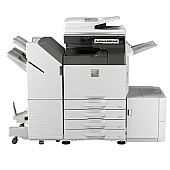
Sharp MX-M3050 Black Toner Cartridges

Sharp MX-M3050 Drum Units

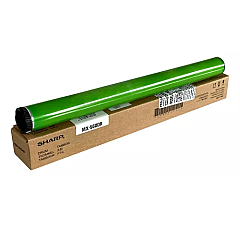
  • Sharp MX560DR Drum

    Item MX560DR

    Sharp MX560DR Drum

    MX-560DR Drum Cartridge; Yield: 300,000 pages..

    Status

    In Stock

    $54.99

Sharp MX-M3050 Copy Paper

Ensure optimal performance for your Sharp MX-M3050 multifunction printer with genuine Sharp MX-M3050 Toner Cartridges. These high-quality consumables are designed to deliver crisp, clear prints and consistent results for your business, educational institution, government office, healthcare facility, or wholesale operation. The Sharp MX-561NT Black Toner Cartridge offers exceptional yield and coverage, reducing the frequency of replacements and minimizing downtime. Paired with the Sharp MX560DR Drum, these components work seamlessly to produce professional-grade documents with sharp text and smooth grayscale images. By choosing authentic Sharp supplies, you'll maximize your printer's efficiency, extend its lifespan, and maintain the superior print quality your organization demands. Trust in the reliability and performance of genuine Sharp MX-M3050 Toner Cartridges to keep your printing operations running smoothly and cost-effectively.

Sharp MX-M3050 Toner Cartridges FAQs

  • What is the page yield of the Sharp MX-561NT Black Toner Cartridge?

    The Sharp MX-561NT Black Toner Cartridge typically yields around 40,000 pages at 5% coverage.

  • Are these toner cartridges compatible with other Sharp printer models?

    The Sharp MX-561NT and MX560DR are specifically designed for the MX-M3050 and some other compatible models in the same series. Always check your printer's specifications for compatibility.

  • How often should I replace the Sharp MX560DR Drum?

    The drum unit typically needs replacement after processing about 100,000 pages, but this can vary based on usage and print conditions.

  • Can I use third-party toner cartridges in my Sharp MX-M3050 printer?

    While third-party cartridges may work, using genuine Sharp toner cartridges ensures optimal print quality and prevents potential damage to your printer.

  • How do I install the Sharp MX-561NT Black Toner Cartridge?

    To install, open the front cover of the printer, remove the old cartridge, and insert the new one until it clicks into place. Refer to your printer's manual for detailed instructions.

  • Are these toner cartridges environmentally friendly?

    Sharp designs its toner cartridges with environmental considerations in mind, often using recyclable materials and offering recycling programs for used cartridges.

  • What should I do if I experience print quality issues after installing a new cartridge?

    First, ensure the cartridge is properly installed. If issues persist, run a printer cleaning cycle or contact Sharp customer support for assistance.

  • Can I store unused toner cartridges for long periods?

    Yes, you can store unused cartridges for up to two years. Keep them in their original packaging, away from direct sunlight, and at room temperature.

  • Does using genuine Sharp toner cartridges affect my printer's warranty?

    Using genuine Sharp toner cartridges helps maintain your printer's warranty. Using third-party cartridges may void the warranty if they cause damage to the printer.

  • How can I tell if my Sharp MX-561NT Black Toner Cartridge is running low?

    The printer's display panel will show a low toner warning when the cartridge is nearing depletion. You can also check toner levels through the printer's settings menu or connected software.

Warehouse Locations

Policy & Agreement | Copyright © 1995-2026 BlueDogInk.com
