





Ads

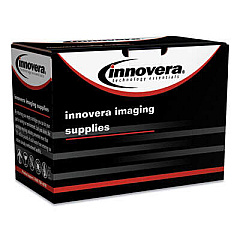
Samsung Xpress M2078 W Black Toner Cartridges

Ensure optimal print quality for your Samsung Xpress M2078 W with our premium toner cartridges. These Samsung Xpress M2078 W Toner Cartridges are designed to deliver crisp, clear text and vibrant images for all your printing needs. Compatible with the Innovera Remanufactured Black Toner, a replacement for MLT-D111S, these cartridges offer a cost-effective solution without compromising on quality. Perfect for businesses, educational institutions, government offices, and healthcare facilities, our toner cartridges provide reliable performance and consistent output. With high-yield options available, you can reduce downtime and increase productivity. Our environmentally friendly remanufactured cartridges help reduce waste while maintaining the same high standards as OEM products. Trust in our Samsung Xpress M2078 W Toner Cartridges to meet your printing demands efficiently and economically, ensuring your documents always look professional.

Samsung Xpress M2078 W Toner Cartridges FAQs

  • Are these toner cartridges compatible with the Samsung Xpress M2078 W printer?

    Yes, these toner cartridges are specifically designed for use with the Samsung Xpress M2078 W printer.

  • What is the page yield of the Innovera Remanufactured Black Toner?

    The page yield varies depending on the specific model, but it typically ranges from 1,000 to 1,500 pages at 5% coverage.

  • Are remanufactured toner cartridges as good as OEM cartridges?

    Remanufactured cartridges from reputable suppliers like Innovera offer comparable quality to OEM cartridges at a lower cost.

  • How long do these toner cartridges last?

    The lifespan of a toner cartridge depends on usage, but typically they can last 6-12 months under normal printing conditions.

  • Can I recycle the used toner cartridges?

    Yes, most toner cartridges can be recycled. Check with your local recycling center or the manufacturer for recycling options.

  • Will using remanufactured cartridges void my printer warranty?

    No, using remanufactured cartridges does not void your printer warranty under the Magnuson-Moss Warranty Act.

  • How do I install the toner cartridge in my Samsung Xpress M2078 W?

    Open the front cover, remove the old cartridge, unpack the new one, and insert it until it clicks into place. Then close the cover.

  • Are these toner cartridges available in colors other than black?

    The Samsung Xpress M2078 W is a monochrome printer, so only black toner cartridges are available for this model.

  • How can I extend the life of my toner cartridge?

    Use draft mode for non-critical prints, shake the cartridge gently when low on toner, and keep the printer in a cool, dry place.

  • What should I do if I experience print quality issues with these cartridges?

    First, try removing and reinserting the cartridge. If issues persist, check your printer settings or contact customer support for assistance.

Warehouse Locations

Policy & Agreement | Copyright © 1995-2026 BlueDogInk.com
