





Ads

Samsung ML-3310 nd Black Toner Cartridges

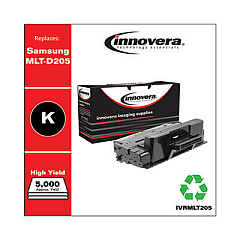
Ensure uninterrupted printing with high-quality Samsung ML-3310 nd Toner Cartridges. These reliable cartridges are designed to deliver crisp, clear text and sharp images for your Samsung ML-3310 nd printer. Our selection includes the Innovera Remanufactured Black Toner, a cost-effective replacement for the original MLT-D205L cartridge. This eco-friendly option offers the same exceptional print quality and page yield as the OEM product, while helping you save money and reduce environmental impact. Compatible with various Samsung printer models, these toner cartridges are perfect for busy offices, schools, healthcare facilities, and government agencies that demand consistent, professional-grade output. Experience hassle-free printing and outstanding results with our Samsung ML-3310 nd Toner Cartridges, backed by our satisfaction guarantee and responsive customer support.

Samsung ML-3310 nd Toner Cartridges FAQs

  • What is the page yield of the Innovera Remanufactured Black Toner?

    The Innovera Remanufactured Black Toner typically yields around 5,000 pages, similar to the original MLT-D205L cartridge.

  • Is the Innovera Remanufactured Black Toner compatible with other Samsung printer models?

    Yes, it is compatible with several Samsung printer models, including the ML-3310, ML-3312, ML-3710, and SCX-5637 series.

  • How long does the toner cartridge last?

    The lifespan of the toner cartridge depends on usage, but it typically lasts for several months in a standard office environment.

  • Are these toner cartridges covered by a warranty?

    Yes, our toner cartridges come with a satisfaction guarantee and warranty against defects.

  • Can I recycle the used toner cartridges?

    Absolutely! We encourage recycling and provide information on how to properly dispose of used cartridges.

  • How do I install the toner cartridge in my Samsung ML-3310 nd printer?

    Installation is simple. Open the printer's front cover, remove the old cartridge, and insert the new one until it clicks into place. Close the cover, and you're ready to print.

  • What should I do if I experience print quality issues?

    First, ensure the cartridge is properly installed. If issues persist, try printing a test page or cleaning the printer's internal components as per the user manual.

  • Are these toner cartridges suitable for high-volume printing?

    Yes, these cartridges are designed to handle high-volume printing needs in busy office environments.

  • How do I store unused toner cartridges?

    Store unused cartridges in a cool, dry place away from direct sunlight. Keep them in their original packaging until ready for use.

  • Can I use third-party toner cartridges without voiding my printer's warranty?

    Using third-party cartridges typically doesn't void the printer's warranty. However, any damage caused by a defective third-party cartridge may not be covered.

Warehouse Locations

Policy & Agreement | Copyright © 1995-2026 BlueDogInk.com
