





Ads

Samsung ML-2165 Black Toner Cartridges

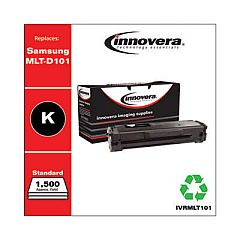
Enhance your printing experience with high-quality Samsung ML-2165 Toner Cartridges. These reliable cartridges are designed to deliver crisp, clear text and sharp images for your Samsung ML-2165 printer. Our selection includes the Innovera Remanufactured Black Toner, a cost-effective replacement for the original MLT-D101S cartridge. This eco-friendly option offers the same exceptional print quality and page yield as the OEM cartridge, while helping you save money and reduce environmental impact. Whether you're printing important business documents, educational materials, or healthcare records, these toner cartridges ensure consistent, professional results. With easy installation and long-lasting performance, Samsung ML-2165 Toner Cartridges are the perfect choice for businesses, schools, government offices, and healthcare facilities looking to maximize their printing efficiency and minimize costs.

Samsung ML-2165 Toner Cartridges FAQs

  • Are these toner cartridges compatible with the Samsung ML-2165 printer?

    Yes, these toner cartridges are specifically designed for use with the Samsung ML-2165 printer.

  • What is the page yield of the Innovera Remanufactured Black Toner?

    The page yield is typically around 1,500 pages, similar to the original MLT-D101S cartridge.

  • Is the Innovera Remanufactured toner as good as the original Samsung cartridge?

    Yes, the Innovera Remanufactured toner offers comparable print quality and page yield to the original Samsung cartridge.

  • How long does a toner cartridge typically last?

    The lifespan of a toner cartridge depends on usage, but it generally lasts for several months under normal printing conditions.

  • Are these toner cartridges environmentally friendly?

    Yes, the Innovera Remanufactured toner cartridges are an eco-friendly option as they reuse cartridge components, reducing waste.

  • Can I use these cartridges for printing high-quality images?

    While primarily designed for text, these cartridges can produce good quality black and white images.

  • How do I install the toner cartridge in my Samsung ML-2165 printer?

    Installation is simple: open the printer's front cover, remove the old cartridge, and insert the new one until it clicks into place.

  • Are these toner cartridges covered by a warranty?

    Yes, most toner cartridges come with a standard warranty against defects in materials and workmanship.

  • Can I recycle the used toner cartridges?

    Yes, many office supply stores and the manufacturer offer recycling programs for used toner cartridges.

  • How can I extend the life of my toner cartridge?

    To extend cartridge life, use draft mode for non-critical prints, shake the cartridge gently when low on toner, and keep the printer in a cool, dry place.

Warehouse Locations

Policy & Agreement | Copyright © 1995-2026 BlueDogInk.com
