





Ads

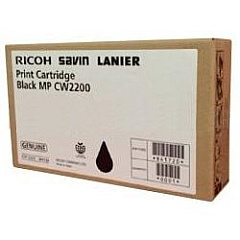
Ricoh Aficio MP CW2200SP Black Ink Cartridges

Enhance your printing experience with genuine Ricoh Aficio MP CW2200SP Ink Cartridges. Designed specifically for the Ricoh Aficio MP CW2200SP wide-format printer, these high-quality cartridges ensure optimal performance and exceptional print quality. The Ricoh 841720 Black Ink Cartridge delivers crisp, clear text and sharp lines, perfect for architectural drawings, engineering plans, and other technical documents. With a generous yield, these cartridges minimize downtime and reduce overall printing costs. Ricoh's advanced ink formulation provides fast-drying, smudge-resistant prints that maintain their quality over time. Whether you're in construction, design, or any field requiring large-format printing, Ricoh Aficio MP CW2200SP Ink Cartridges offer reliability and professional results. Trust in Ricoh's commitment to quality and innovation to keep your projects moving forward with precision and clarity.

Ricoh Aficio MP CW2200SP Printers Supplies FAQs

  • What is the page yield of the Ricoh 841720 Black Ink Cartridge?

    The Ricoh 841720 Black Ink Cartridge has a yield of approximately 400 ml of ink. Actual page yield may vary depending on print coverage and settings.

  • Are these ink cartridges compatible with other Ricoh printers?

    The Ricoh 841720 Black Ink Cartridge is specifically designed for the Ricoh Aficio MP CW2200SP printer. It may not be compatible with other Ricoh models.

  • How long do these ink cartridges last?

    The lifespan of the cartridge depends on usage frequency and print volume. Under normal use, they typically last several months to a year.

  • Are these genuine Ricoh cartridges?

    Yes, these are genuine Ricoh ink cartridges, ensuring optimal performance and print quality for your Ricoh Aficio MP CW2200SP printer.

  • Can I use third-party ink cartridges in my Ricoh Aficio MP CW2200SP?

    While third-party cartridges may work, using genuine Ricoh cartridges is recommended to ensure the best print quality and to maintain your printer's warranty.

  • How do I install the ink cartridge in my Ricoh Aficio MP CW2200SP?

    Installation is simple. Open the printer's front cover, locate the cartridge slot, remove the old cartridge, and insert the new one until it clicks into place. Refer to your printer's manual for detailed instructions.

  • What should I do if my prints are coming out faded or streaky?

    First, check if the ink cartridge is low or empty. If not, try running a print head cleaning cycle. If issues persist, the cartridge may be defective and need replacement.

  • Can I recycle used Ricoh ink cartridges?

    Yes, Ricoh offers a recycling program for used cartridges. Check Ricoh's website or contact their customer service for details on how to participate.

  • Does the Ricoh Aficio MP CW2200SP use color ink cartridges?

    The Ricoh Aficio MP CW2200SP primarily uses black ink for monochrome printing. Color cartridges are not typically used in this model.

  • How can I check the ink levels in my Ricoh Aficio MP CW2200SP?

    You can check ink levels through the printer's control panel or via the printer driver on your computer. Consult your printer's manual for specific instructions.

Warehouse Locations

Policy & Agreement | Copyright © 1995-2026 BlueDogInk.com
