




Ads

Rena PS 1000 Black Ink Cartridges

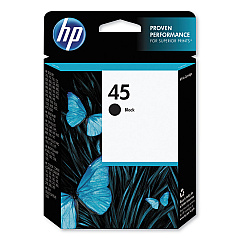
Ensure uninterrupted operation of your Rena PS 1000 addressing system with genuine Rena PS 1000 Ink Cartridges. These high-quality cartridges are designed specifically for optimal performance in your Rena PS 1000 printer, delivering crisp, clear imprints on a variety of mailing materials. Compatible with the widely-used HP 45 Black Ink Cartridge (51645A), these cartridges offer exceptional print quality and reliability for your high-volume mailing needs. Whether you're managing direct mail campaigns, addressing envelopes, or printing barcodes, these ink cartridges provide consistent, smudge-resistant results. With a generous ink capacity, you'll experience fewer cartridge changes and reduced downtime, maximizing your productivity. Trust in the superior quality of Rena PS 1000 Ink Cartridges to maintain the professional appearance of your mailings and keep your addressing system running smoothly.

Rena PS 1000 Ink Cartridges FAQs

  • Are Rena PS 1000 Ink Cartridges compatible with other Rena printers?

    Rena PS 1000 Ink Cartridges are specifically designed for use with the Rena PS 1000 addressing system. They may not be compatible with other Rena printer models.

  • How long do Rena PS 1000 Ink Cartridges typically last?

    The lifespan of a cartridge depends on usage, but on average, a single cartridge can print thousands of addresses before needing replacement.

  • Can I use third-party ink cartridges in my Rena PS 1000 printer?

    While third-party cartridges may work, using genuine Rena PS 1000 Ink Cartridges ensures optimal performance and print quality, and helps maintain your printer's warranty.

  • How do I install a new ink cartridge in my Rena PS 1000?

    To install a new cartridge, open the printer cover, remove the old cartridge, insert the new one until it clicks into place, and close the cover. Refer to your printer's manual for detailed instructions.

  • Are Rena PS 1000 Ink Cartridges environmentally friendly?

    Rena encourages recycling of used cartridges. Check with your local recycling facilities or Rena's recycling program for proper disposal methods.

  • Can I refill Rena PS 1000 Ink Cartridges?

    Refilling cartridges is not recommended as it may affect print quality and potentially damage your printer. It's best to use new, genuine cartridges.

  • How should I store unused Rena PS 1000 Ink Cartridges?

    Store cartridges in a cool, dry place at room temperature. Keep them in their original packaging until ready for use to prevent the ink from drying out.

  • What should I do if my prints are faded or streaky?

    First, try cleaning the print heads using your printer's maintenance function. If the problem persists, the cartridge may be low on ink or defective and need replacement.

  • Are Rena PS 1000 Ink Cartridges available in colors other than black?

    The Rena PS 1000 typically uses black ink for addressing purposes. Color cartridges are not standard for this model.

  • How can I check the ink levels in my Rena PS 1000 Ink Cartridge?

    Most Rena PS 1000 printers have an ink level indicator on the control panel. You can also check ink levels through the printer software on your connected computer.

Warehouse Locations

Policy & Agreement | Copyright © 1995-2026 BlueDogInk.com
