




Ads

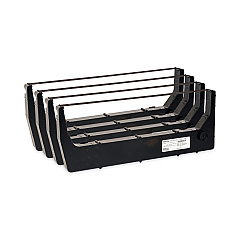
Printronix P7005ZT Printer Ribbon

Ensure uninterrupted performance with high-quality Printronix P7005ZT Impact Printers Supplies. These essential components are designed specifically for the robust P7005ZT printer, known for its reliability in demanding environments. The Printronix 255049-402 Ribbon Cartridges are a key element of these supplies, offering crisp, clear prints and extended life to maximize your printer's efficiency. Whether you're in a busy warehouse, manufacturing facility, or high-volume office setting, these supplies deliver consistent results page after page. The P7005ZT's versatility in handling various paper types and sizes makes it ideal for businesses, educational institutions, government agencies, and healthcare facilities that require dependable, high-volume printing. By choosing genuine Printronix supplies, you're investing in the longevity of your printer and the quality of your printed materials. Don't compromise on your printing needs – trust in Printronix P7005ZT Impact Printers Supplies for optimal performance.

Printronix P7005ZT Impact Printers Supplies FAQs

  • How often should I replace the ribbon cartridge in my Printronix P7005ZT printer?

    The replacement frequency depends on usage, but typically every 30 million characters or when print quality noticeably decreases.

  • Are Printronix 255049-402 Ribbon Cartridges compatible with other Printronix printer models?

    These cartridges are specifically designed for the P7005ZT model. Always check compatibility before purchasing for other models.

  • Can I use third-party ribbon cartridges in my Printronix P7005ZT printer?

    While third-party options exist, using genuine Printronix supplies ensures optimal performance and prevents potential damage to your printer.

  • What is the shelf life of unused Printronix P7005ZT ribbon cartridges?

    Unopened cartridges typically have a shelf life of 1-2 years when stored properly in a cool, dry place.

  • How do I install a new ribbon cartridge in the Printronix P7005ZT printer?

    Open the printer cover, remove the old cartridge, align the new cartridge with the print head, and snap it into place. Refer to the user manual for detailed instructions.

  • What paper types can the Printronix P7005ZT printer handle?

    The P7005ZT can handle various paper types including continuous forms, cut sheets, and multi-part forms.

  • How can I extend the life of my Printronix P7005ZT ribbon cartridge?

    Avoid printing unnecessarily, use draft mode when possible, and ensure proper printer maintenance to maximize cartridge life.

  • Are Printronix P7005ZT Impact Printers Supplies environmentally friendly?

    Printronix strives for environmental responsibility, but it's best to check their current policies regarding recycling and eco-friendly practices.

  • Can I purchase Printronix P7005ZT supplies in bulk for my business?

    Yes, many suppliers offer bulk purchasing options for businesses with high-volume printing needs.

  • What should I do if I experience print quality issues with my Printronix P7005ZT printer?

    First, check if the ribbon cartridge needs replacement. If issues persist, clean the print head and check for any paper jams or debris in the printer.

Warehouse Locations

Policy & Agreement | Copyright © 1995-2026 BlueDogInk.com
