




Ads

Primera Bravo SE-3 AutoPrinter Color Ink Cartridges

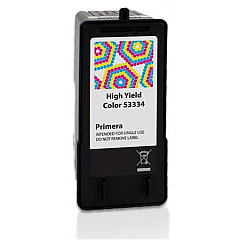
Enhance your printing experience with Primera Bravo SE-3 AutoPrinter Ink Cartridges, designed specifically for the Primera Bravo SE-3 AutoPrinter. These high-quality ink cartridges, including the Primera 53334 Color Ink Cartridge, deliver exceptional results for businesses, educational institutions, government agencies, healthcare facilities, and wholesale operations. Offering vibrant colors and sharp text, these cartridges ensure professional-grade output for your CD, DVD, and Blu-ray disc printing needs. The Primera Bravo SE-3 AutoPrinter Ink Cartridges are engineered to maximize efficiency and minimize waste, providing cost-effective solutions for high-volume printing tasks. Compatible with a range of media types, these cartridges guarantee consistent performance and long-lasting prints. Invest in Primera Bravo SE-3 AutoPrinter Ink Cartridges to maintain the superior quality of your automated disc printing system and elevate your organization's printing capabilities.

Primera Bravo SE-3 AutoPrinter Ink Cartridges FAQs

  • What is the page yield of the Primera 53334 Color Ink Cartridge?

    The page yield varies depending on the type of content being printed, but it typically produces around 300-400 full-color discs.

  • Are these ink cartridges compatible with other Primera printers?

    No, these cartridges are specifically designed for use with the Primera Bravo SE-3 AutoPrinter and may not be compatible with other models.

  • How long do unopened ink cartridges last?

    Unopened ink cartridges typically have a shelf life of 1-2 years when stored properly in a cool, dry place.

  • Can I use third-party ink cartridges with the Primera Bravo SE-3 AutoPrinter?

    It is recommended to use genuine Primera ink cartridges to ensure optimal performance and print quality, as well as to maintain your printer's warranty.

  • How do I install the ink cartridge in the Primera Bravo SE-3 AutoPrinter?

    To install the cartridge, open the printer's front cover, remove the old cartridge, and insert the new one until it clicks into place. Close the cover and follow any on-screen prompts to complete the installation.

  • What types of media can I print on using these ink cartridges?

    These ink cartridges are suitable for printing on various types of printable CDs, DVDs, and Blu-ray discs.

  • How can I tell when my ink cartridge needs to be replaced?

    The printer software will typically alert you when ink levels are low. You may also notice a decrease in print quality or missing colors in your prints.

  • Are these ink cartridges environmentally friendly?

    Primera strives to produce environmentally responsible products. However, for specific details on the environmental impact of these cartridges, please consult the manufacturer's documentation.

  • Can I recycle used Primera Bravo SE-3 AutoPrinter Ink Cartridges?

    Yes, Primera offers a recycling program for used ink cartridges. Check their website or contact customer support for details on how to participate.

  • What should I do if I experience print quality issues with these cartridges?

    First, try cleaning the print heads using the printer's built-in maintenance functions. If issues persist, ensure you're using genuine Primera cartridges and contact customer support for further assistance.

Warehouse Locations

Policy & Agreement | Copyright © 1995-2026 BlueDogInk.com
