





Ads

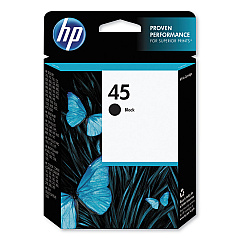
Pitney Bowes PS-2000 Adressing System Black Ink Cartridges

Ensure your Pitney Bowes PS-2000 Addressing System operates at peak performance with our high-quality ink cartridges. These Pitney Bowes PS-2000 Addressing System Ink Cartridges are designed to deliver crisp, clear prints for all your mailing needs. Compatible with the HP 45 Black Ink Cartridge (51645A), these cartridges offer exceptional print quality and reliability. Whether you're managing a small business or a large-scale mailing operation, these ink cartridges provide consistent results, reducing downtime and improving efficiency. With their long-lasting formula, you'll enjoy extended use between replacements, making them a cost-effective choice for your addressing system. Don't compromise on quality – choose our Pitney Bowes PS-2000 Addressing System Ink Cartridges for professional-grade results every time. Order now to keep your mailing operations running smoothly and your communications looking sharp.

Pitney Bowes PS-2000 Adressing System Ink Cartridges FAQs

  • Are these ink cartridges compatible with other Pitney Bowes addressing systems?

    These cartridges are specifically designed for the Pitney Bowes PS-2000 Addressing System. Please check your system's compatibility before purchasing.

  • How many pages can I print with one cartridge?

    Page yield varies depending on print density and content. On average, an HP 45 Black Ink Cartridge can print approximately 930 pages at 5% coverage.

  • Are these OEM or compatible cartridges?

    These are genuine HP 45 Black Ink Cartridges (51645A), which are the OEM cartridges recommended for use in the Pitney Bowes PS-2000 Addressing System.

  • How long do these ink cartridges last before expiring?

    Typically, unopened ink cartridges have a shelf life of 24 months from the date of manufacture. Once opened, it's best to use them within 6-12 months for optimal performance.

  • Can I use these cartridges in my HP printer?

    Yes, the HP 45 Black Ink Cartridge (51645A) is compatible with various HP printers. Check your printer's specifications to confirm compatibility.

  • How do I install the ink cartridge in my Pitney Bowes PS-2000 Addressing System?

    Consult your Pitney Bowes PS-2000 user manual for specific installation instructions. Generally, you'll need to open the ink cartridge compartment, remove the old cartridge, and insert the new one until it clicks into place.

  • What should I do if the print quality deteriorates?

    First, try cleaning the print heads using your system's maintenance function. If the issue persists, the cartridge may be low on ink or faulty and need replacement.

  • Are these ink cartridges environmentally friendly?

    HP has a recycling program for used ink cartridges. You can return empty cartridges to HP or participating retailers for proper recycling.

  • Can I refill these ink cartridges?

    While it's possible to refill these cartridges, it's not recommended as it may affect print quality and potentially damage your addressing system. It's best to use new, genuine cartridges.

  • Do you offer bulk discounts for these ink cartridges?

    Yes, we offer discounts for bulk purchases. Please contact our customer service team for more information on volume pricing.

Warehouse Locations

Policy & Agreement | Copyright © 1995-2026 BlueDogInk.com
