





Ads

Pitney Bowes DM220i Color Ink Cartridges

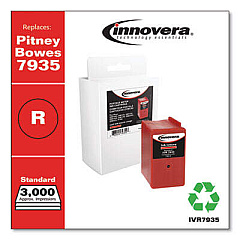
Ensure your Pitney Bowes DM220i mailing system operates at peak efficiency with our premium Pitney Bowes DM220i Ink Cartridges. These high-quality ink cartridges, including the Innovera Compatible Red Postage Meter Ink, are designed to deliver crisp, clear imprints for all your postage needs. Compatible with the DM220i model, these cartridges offer a cost-effective solution without compromising on print quality. Our ink cartridges are formulated to meet USPS regulations, ensuring your mailings comply with postal standards. Whether you're managing a small office or a large-scale mailing operation, these reliable cartridges provide consistent performance and long-lasting results. Maximize your productivity and minimize downtime with our easy-to-install Pitney Bowes DM220i Ink Cartridges. Trust in our products to keep your mailing processes running smoothly and efficiently.

Pitney Bowes DM220i Ink Cartridges FAQs

  • How long do Pitney Bowes DM220i Ink Cartridges typically last?

    The lifespan of a cartridge depends on usage, but on average, it can last for about 3,000 to 5,000 impressions.

  • Are these ink cartridges compatible with other Pitney Bowes models?

    These cartridges are specifically designed for the DM220i model. Always check compatibility before purchasing for other models.

  • How do I know when it's time to replace my ink cartridge?

    Your DM220i will display a low ink warning when it's time to replace the cartridge. You may also notice fading or incomplete imprints.

  • Is the Innovera Compatible Red Postage Meter Ink approved by USPS?

    Yes, the Innovera Compatible ink is formulated to meet USPS regulations for postage meter ink.

  • Can I use non-Pitney Bowes brand ink cartridges in my DM220i?

    While compatible cartridges like Innovera can be used, it's important to ensure they meet quality standards and are designed for your specific model.

  • How do I install a new ink cartridge in my Pitney Bowes DM220i?

    Open the ink cartridge cover, remove the old cartridge, insert the new one until it clicks into place, and close the cover. The machine will recognize the new cartridge automatically.

  • What should I do if my prints are smudging or unclear after installing a new cartridge?

    Try running a print head cleaning cycle. If issues persist, ensure the cartridge is properly seated and compatible with your model.

  • Are these ink cartridges environmentally friendly?

    Many cartridges are recyclable. Check with the manufacturer or local recycling centers for proper disposal methods.

  • Can I refill these ink cartridges myself?

    It's not recommended to refill these cartridges yourself as it may affect print quality and potentially damage your machine.

  • Do you offer bulk discounts on Pitney Bowes DM220i Ink Cartridges?

    Yes, we often provide discounts for bulk purchases. Contact our sales team for more information on volume pricing.

Warehouse Locations

Policy & Agreement | Copyright © 1995-2026 BlueDogInk.com
