





Ads

Panasonic Panafax UF-890 Black Toner Cartridges

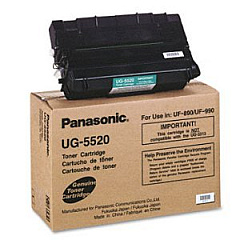
Enhance your office productivity with genuine Panasonic Panafax UF-890 Toner Cartridges. These high-quality cartridges are specifically designed for the Panasonic Panafax UF-890 fax machine, ensuring optimal performance and crisp, clear prints. The Panasonic UG-5520 Black Toner Cartridge is the perfect choice for businesses, educational institutions, government offices, and healthcare facilities that demand reliable and cost-effective printing solutions. With its impressive yield and consistent output, this toner cartridge minimizes downtime and maximizes efficiency. Experience superior print quality and sharp text with every page, thanks to Panasonic's advanced toner technology. By choosing authentic Panasonic Panafax UF-890 Toner Cartridges, you're investing in dependable performance and extending the life of your fax machine. Don't compromise on quality – trust Panasonic for all your UF-890 toner needs.

Panasonic Panafax UF-890 Fax Machines Supplies FAQs

  • What is the page yield of the Panasonic UG-5520 Black Toner Cartridge?

    The Panasonic UG-5520 Black Toner Cartridge has an approximate yield of 10,000 pages at 5% coverage.

  • Is this toner cartridge compatible with other Panasonic fax machines?

    The UG-5520 toner cartridge is specifically designed for the Panasonic Panafax UF-890. It may be compatible with other models, but it's best to check your machine's specifications.

  • How long does the toner cartridge typically last?

    The lifespan of the toner cartridge depends on usage, but with average use, it can last several months to a year.

  • Are these genuine Panasonic toner cartridges?

    Yes, these are genuine Panasonic toner cartridges, ensuring the best quality and compatibility with your Panafax UF-890.

  • Can I recycle the used toner cartridges?

    Yes, Panasonic offers a recycling program for used toner cartridges. Check their website or contact customer support for details.

  • How do I install the new toner cartridge in my Panafax UF-890?

    Installation is simple. Open the front cover, remove the old cartridge, and insert the new one until it clicks into place. Refer to your user manual for detailed instructions.

  • What should I do if I experience print quality issues?

    First, ensure the cartridge is properly installed. If issues persist, try cleaning the print head or running a maintenance cycle as described in your user manual.

  • Do you offer bulk discounts for these toner cartridges?

    Yes, we offer discounts for bulk purchases. Please contact our sales team for more information on volume pricing.

  • How should I store unused toner cartridges?

    Store unused cartridges in a cool, dry place away from direct sunlight. Keep them in their original packaging until ready for use.

  • What is the warranty on these toner cartridges?

    Genuine Panasonic toner cartridges come with a standard manufacturer's warranty. Please check the packaging or contact Panasonic support for specific warranty details.

Warehouse Locations

Policy & Agreement | Copyright © 1995-2026 BlueDogInk.com
