




Ads

Olivetti P 602 Black Toner Cartridges

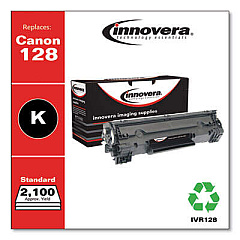
Ensure uninterrupted printing with high-quality Olivetti P 602 Toner Cartridges. These reliable cartridges are designed to deliver crisp, clear text and vibrant images for your Olivetti P 602 printer. Compatible with the Innovera Remanufactured Black Toner, a replacement for the 128 (3500B001AA) cartridge, these toners offer an eco-friendly and cost-effective alternative without compromising on print quality. Perfect for businesses, educational institutions, government offices, and healthcare facilities, these toners provide consistent performance and long-lasting results. With a generous page yield, you'll experience fewer interruptions and reduced downtime. Choose Olivetti P 602 Toner Cartridges for dependable, professional-grade prints that meet your high-volume printing needs. Invest in these cartridges to maintain the efficiency of your Olivetti P 602 printer while enjoying significant savings on your printing costs.

Olivetti P 602 Calculators Supplies FAQs

  • What is the page yield of the Olivetti P 602 Toner Cartridge?

    The page yield varies depending on the specific cartridge model, but it typically ranges from 2,000 to 3,500 pages.

  • Are these toner cartridges compatible with other Olivetti printer models?

    These cartridges are specifically designed for the Olivetti P 602 printer. Always check your printer's compatibility before purchasing.

  • How long do Olivetti P 602 Toner Cartridges last?

    The lifespan depends on usage, but under normal conditions, they can last several months to a year.

  • Are remanufactured toner cartridges as good as original ones?

    High-quality remanufactured cartridges, like the Innovera replacement, can offer comparable print quality and performance to original cartridges.

  • How can I extend the life of my Olivetti P 602 Toner Cartridge?

    To extend cartridge life, use draft mode for non-critical prints, shake the cartridge gently when low on toner, and keep your printer in a cool, dry place.

  • What should I do with empty Olivetti P 602 Toner Cartridges?

    Empty cartridges should be recycled. Many office supply stores offer toner cartridge recycling programs.

  • How do I install a new Olivetti P 602 Toner Cartridge?

    Consult your printer's manual for specific instructions, but generally, you'll need to open the printer, remove the old cartridge, and insert the new one until it clicks into place.

  • Can using third-party toner cartridges void my printer warranty?

    Using third-party cartridges typically doesn't void the printer warranty, but it's always best to check your warranty terms or contact Olivetti for confirmation.

  • How do I know when it's time to replace my Olivetti P 602 Toner Cartridge?

    Your printer will usually display a low toner warning. You may also notice faded prints or streaks on your pages.

  • Are Olivetti P 602 Toner Cartridges available in colors other than black?

    The Olivetti P 602 is a monochrome printer, so it only uses black toner cartridges.

Warehouse Locations

Policy & Agreement | Copyright © 1995-2026 BlueDogInk.com
