




Olivetti OL 5700 Retail Equip. POS/Cash Reg. Supplies

Ads

Olivetti OL 5700 POS Printer Ribbon

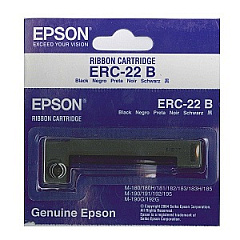
Ensure your Olivetti OL 5700 Retail Equip. POS/Cash Reg. Supplies are always stocked and ready for seamless transactions. This reliable point-of-sale system is essential for businesses, schools, government offices, healthcare facilities, and wholesale operations. Compatible with the high-quality Epson ERC-22 Black Ribbon Cartridge, the Olivetti OL 5700 delivers crisp, clear receipts and reports. Designed for durability and efficiency, this cash register meets the demands of high-volume retail environments. Keep your operations running smoothly with genuine supplies that guarantee optimal performance. Whether you're managing a bustling retail store or a busy cafeteria, the Olivetti OL 5700 and its supplies provide the reliability and functionality you need. Don't let supply shortages interrupt your business – stock up on Olivetti OL 5700 Retail Equip. POS/Cash Reg. Supplies today and ensure uninterrupted service for your customers.

Olivetti OL 5700 Retail Equip. POS/Cash Reg. Supplies FAQs

  • What type of ribbon cartridge does the Olivetti OL 5700 use?

    The Olivetti OL 5700 uses the Epson ERC-22 Black Ribbon Cartridge.

  • How often should I replace the ribbon cartridge in my Olivetti OL 5700?

    Replacement frequency depends on usage, but typically every 3-6 months or when print quality diminishes.

  • Is the Olivetti OL 5700 suitable for small businesses?

    Yes, the Olivetti OL 5700 is ideal for small to medium-sized businesses across various industries.

  • Can I use generic ribbon cartridges with the Olivetti OL 5700?

    While generic cartridges may work, using genuine Epson ERC-22 cartridges ensures optimal performance and print quality.

  • Does the Olivetti OL 5700 require special paper?

    The Olivetti OL 5700 uses standard thermal paper rolls, which are widely available.

  • How do I clean my Olivetti OL 5700 cash register?

    Use a soft, dry cloth to clean the exterior. For internal cleaning, consult the user manual or a professional technician.

  • Can the Olivetti OL 5700 be connected to a computer system?

    Yes, the Olivetti OL 5700 can be integrated with various POS software systems for enhanced functionality.

  • What should I do if my Olivetti OL 5700 stops printing clearly?

    First, try replacing the ribbon cartridge. If the issue persists, clean the print head or consult a technician.

  • Is the Olivetti OL 5700 compatible with barcode scanners?

    Yes, the Olivetti OL 5700 can be used with compatible barcode scanners for efficient inventory management.

  • How long is the warranty on the Olivetti OL 5700?

    Warranty terms may vary, so check with your supplier or Olivetti's official website for specific warranty information.

Warehouse Locations

Policy & Agreement | Copyright © 1995-2026 BlueDogInk.com
