




Ads

Olivetti Audit Series 1506 Black Toner Cartridges

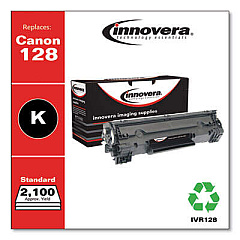
Ensure peak performance and crisp prints with Olivetti Audit Series 1506 Toner Cartridges. These high-quality cartridges are designed specifically for the Olivetti Audit Series 1506 printer, delivering exceptional results for businesses, educational institutions, government offices, healthcare facilities, and wholesale operations. The Innovera Remanufactured Black Toner, a replacement for the 128 (3500B001AA), offers a cost-effective and environmentally friendly alternative without compromising on quality. With its reliable output and impressive page yield, this toner cartridge maximizes productivity and minimizes downtime. Experience consistent, professional-grade prints that meet the demands of high-volume printing environments. Whether you're producing reports, invoices, or other critical documents, Olivetti Audit Series 1506 Toner Cartridges ensure your prints make a lasting impression. Trust in the superior performance and value of these toner cartridges for all your printing needs.

Olivetti Audit Series 1506 Calculators Supplies FAQs

  • What is the page yield of the Olivetti Audit Series 1506 Toner Cartridge?

    The page yield varies depending on the specific cartridge model, but it typically ranges from 2,000 to 3,500 pages at 5% coverage.

  • Is the Innovera Remanufactured Black Toner compatible with the Olivetti Audit Series 1506 printer?

    Yes, the Innovera Remanufactured Black Toner is fully compatible with the Olivetti Audit Series 1506 printer.

  • How long does an Olivetti Audit Series 1506 Toner Cartridge typically last?

    The lifespan of the cartridge depends on usage, but under normal printing conditions, it can last several months to a year.

  • Are these toner cartridges environmentally friendly?

    Yes, the Innovera Remanufactured Black Toner is an environmentally friendly option as it reuses cartridge components, reducing waste.

  • Can I recycle the used Olivetti Audit Series 1506 Toner Cartridges?

    Yes, most toner cartridges can be recycled. Check with your local recycling center or the manufacturer for specific recycling programs.

  • How do I install the toner cartridge in my Olivetti Audit Series 1506 printer?

    Installation is typically straightforward. Open the printer's front panel, remove the old cartridge, and insert the new one until it clicks into place. Consult your printer's manual for specific instructions.

  • Are these toner cartridges covered by a warranty?

    Yes, most toner cartridges come with a standard warranty. Check the product details or contact the seller for specific warranty information.

  • How can I extend the life of my Olivetti Audit Series 1506 Toner Cartridge?

    To extend cartridge life, use draft mode for non-critical prints, shake the cartridge gently when low on toner, and keep the printer in a clean, dry environment.

  • Can I use third-party toner cartridges in my Olivetti Audit Series 1506 printer?

    While third-party cartridges may work, it's recommended to use compatible or remanufactured cartridges like the Innovera Remanufactured Black Toner to ensure optimal performance and prevent potential damage to your printer.

  • How do I know when it's time to replace my Olivetti Audit Series 1506 Toner Cartridge?

    Your printer will typically display a low toner warning. You may also notice faded prints or streaks on your documents, indicating it's time for a replacement.

Warehouse Locations

Policy & Agreement | Copyright © 1995-2026 BlueDogInk.com
