




NCR Tellerscan TS 240 Financial/Bank Machines Supplies

Ads

NCR Tellerscan TS 240 Black Ink Cartridges

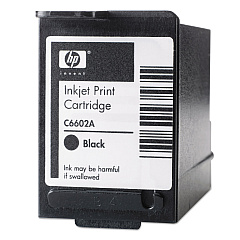
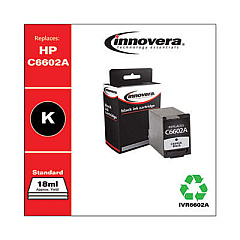
Ensure uninterrupted operation of your financial institution's check processing system with high-quality NCR Tellerscan TS 240 Ink Cartridges. These reliable ink cartridges are specifically designed for use in the NCR Tellerscan TS 240, a widely-used check scanner in banks, credit unions, and other financial services. Compatible options include the original HP C6602A Black Ink Cartridge and the cost-effective Innovera Remanufactured Black Ink, a replacement for C6602A. Both cartridges deliver crisp, clear imprints essential for accurate check processing and record-keeping. By choosing these dependable ink supplies, you'll maintain optimal performance of your NCR Tellerscan TS 240, ensuring smooth operations and customer satisfaction. Whether you opt for the OEM or remanufactured option, these cartridges offer the quality and reliability needed to keep your financial transactions running smoothly.

NCR Tellerscan TS 240 Financial/Bank Machines Supplies FAQs

  • What is the page yield of the HP C6602A Black Ink Cartridge?

    The HP C6602A Black Ink Cartridge typically yields around 18 million characters.

  • Is the Innovera Remanufactured Black Ink compatible with the NCR Tellerscan TS 240?

    Yes, the Innovera Remanufactured Black Ink is fully compatible with the NCR Tellerscan TS 240 and is designed as a replacement for the C6602A cartridge.

  • How often should I replace the ink cartridge in my NCR Tellerscan TS 240?

    The frequency of replacement depends on usage, but typically, you should replace the cartridge when print quality diminishes or when the machine indicates low ink levels.

  • Can I use non-OEM ink cartridges in my NCR Tellerscan TS 240?

    Yes, you can use compatible or remanufactured cartridges like the Innovera Remanufactured Black Ink, which is designed to work with the NCR Tellerscan TS 240.

  • What's the difference between OEM and remanufactured ink cartridges?

    OEM cartridges are made by the original equipment manufacturer (HP in this case), while remanufactured cartridges are recycled OEM cartridges that have been cleaned, refilled, and tested to meet quality standards.

  • How do I install a new ink cartridge in the NCR Tellerscan TS 240?

    To install a new cartridge, open the ink cartridge compartment, remove the old cartridge, insert the new one, and close the compartment. Refer to your device manual for specific instructions.

  • Are these ink cartridges environmentally friendly?

    The Innovera Remanufactured Black Ink cartridge is more environmentally friendly as it reuses the cartridge shell, reducing waste. HP also offers recycling programs for their OEM cartridges.

  • How long can I store unused ink cartridges?

    Unopened ink cartridges can typically be stored for up to two years. Always check the expiration date on the package and store them in a cool, dry place.

  • Will using remanufactured ink cartridges void my NCR Tellerscan TS 240 warranty?

    Using remanufactured cartridges generally does not void the warranty of your device. However, any damage caused directly by a third-party cartridge may not be covered.

  • Can I refill these ink cartridges myself?

    It's not recommended to refill these cartridges yourself as it can lead to poor print quality and potential damage to your NCR Tellerscan TS 240. It's best to use new OEM or professionally remanufactured cartridges.

Warehouse Locations

Policy & Agreement | Copyright © 1995-2026 BlueDogInk.com
