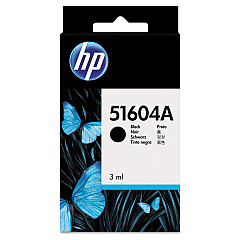





NCR Tellerscan TS 200 Financial/Bank Machines Supplies

Ads

NCR Tellerscan TS 200 Black Ink Cartridges

Ensure uninterrupted operation of your financial institution's check processing system with our high-quality NCR Tellerscan TS 200 Ink Cartridges. These reliable ink cartridges are designed specifically for the NCR Tellerscan TS 200, providing crisp, clear imprints for accurate document processing. Choose from the original HP 51604A Black Ink Cartridge for guaranteed OEM quality or opt for the cost-effective Innovera Remanufactured Black Ink, a perfect replacement for the 51604A. Both options deliver exceptional print quality and longevity, minimizing downtime and maximizing efficiency in your banking operations. Whether you're processing checks, printing endorsements, or handling other financial documents, these ink cartridges ensure consistent, professional results. Invest in the right supplies to keep your NCR Tellerscan TS 200 running smoothly and maintain the highest standards of document processing in your financial institution.

NCR Tellerscan TS 200 Financial/Bank Machines Supplies FAQs

  • What is the page yield of the HP 51604A Black Ink Cartridge?

    The HP 51604A Black Ink Cartridge typically yields around 3 million characters.

  • Is the Innovera Remanufactured Black Ink compatible with the NCR Tellerscan TS 200?

    Yes, the Innovera Remanufactured Black Ink is fully compatible with the NCR Tellerscan TS 200 and serves as an excellent replacement for the 51604A.

  • How often should I replace the ink cartridge in my NCR Tellerscan TS 200?

    The replacement frequency depends on usage, but typically, you should replace the cartridge when print quality diminishes or after processing approximately 3 million characters.

  • Can I use third-party ink cartridges in my NCR Tellerscan TS 200?

    While third-party cartridges may work, we recommend using either the original HP 51604A or the Innovera Remanufactured ink to ensure optimal performance and prevent potential damage to your device.

  • How do I install a new ink cartridge in the NCR Tellerscan TS 200?

    To install a new cartridge, open the printer cover, remove the old cartridge, insert the new one ensuring it clicks into place, and close the cover. Refer to your device manual for specific instructions.

  • Are these ink cartridges environmentally friendly?

    The Innovera Remanufactured ink cartridge is an environmentally friendly option as it reuses cartridge components, reducing waste. HP also offers recycling programs for their cartridges.

  • What's the shelf life of these ink cartridges?

    Unopened ink cartridges typically have a shelf life of 1-2 years. Always check the expiration date on the package before use.

  • Can I use these cartridges in other NCR Tellerscan models?

    These cartridges are specifically designed for the NCR Tellerscan TS 200. They may not be compatible with other models. Always check your device's specifications before purchasing.

  • How long does shipping take for these ink cartridges?

    Shipping times vary depending on your location and chosen shipping method. Please check the shipping options at checkout for estimated delivery times.

  • Do you offer bulk discounts for these ink cartridges?

    Yes, we offer discounts for bulk purchases. Please contact our customer service team for more information on bulk pricing.

Warehouse Locations

Policy & Agreement | Copyright © 1995-2026 BlueDogInk.com
