




NCR 230 Tellerscan TS Financial/Bank Machines Supplies

Ads

NCR 230 Tellerscan TS Black Ink Cartridges

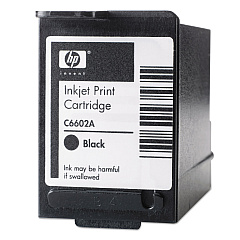
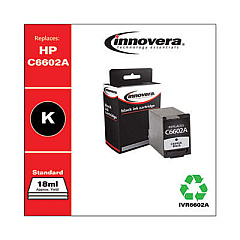
Ensure uninterrupted operation of your NCR 230 Tellerscan TS with our high-quality NCR 230 Tellerscan TS Ink Cartridges. Compatible with the HP C6602A Black Ink Cartridge, these cartridges deliver crisp, clear prints for all your banking and financial document needs. We also offer the cost-effective Innovera Remanufactured Black Ink, a reliable replacement for C6602A, providing the same excellent print quality at a fraction of the cost. Our ink cartridges are designed to meet the demanding requirements of high-volume check processing environments, ensuring consistent performance and longevity. Whether you're in the banking, healthcare, or government sector, our NCR 230 Tellerscan TS Ink Cartridges provide the reliability and efficiency you need to keep your operations running smoothly. Don't let low ink slow you down – stock up on these essential supplies today and maintain peak performance of your NCR 230 Tellerscan TS.

NCR 230 Tellerscan TS Financial/Bank Machines Supplies FAQs

  • How long does an NCR 230 Tellerscan TS ink cartridge typically last?

    The lifespan of an ink cartridge depends on usage, but typically it can last for about 7 million characters or 500,000 checks.

  • Are the Innovera Remanufactured cartridges compatible with the NCR 230 Tellerscan TS?

    Yes, the Innovera Remanufactured Black Ink cartridges are fully compatible with the NCR 230 Tellerscan TS.

  • How do I know when it's time to replace my ink cartridge?

    The NCR 230 Tellerscan TS typically has a low ink indicator. Also, if you notice faded or incomplete prints, it's time to replace the cartridge.

  • Can I use non-OEM ink cartridges in my NCR 230 Tellerscan TS?

    Yes, you can use compatible cartridges like the Innovera Remanufactured Black Ink, which is designed to work with the NCR 230 Tellerscan TS.

  • How should I store unused ink cartridges?

    Store unused cartridges in a cool, dry place, away from direct sunlight. Keep them in their original packaging until ready to use.

  • What's the difference between the HP C6602A and the Innovera Remanufactured cartridge?

    The HP C6602A is the original manufacturer's cartridge, while the Innovera is a remanufactured version that offers similar quality at a lower price point.

  • How do I install a new ink cartridge in the NCR 230 Tellerscan TS?

    Open the cartridge compartment, remove the old cartridge, insert the new one ensuring it clicks into place, and close the compartment. Refer to your device manual for specific instructions.

  • Are these ink cartridges environmentally friendly?

    The Innovera Remanufactured cartridges are more environmentally friendly as they reuse cartridge bodies, reducing waste. HP also offers a recycling program for their cartridges.

  • What should I do if the ink cartridge is not recognized by the device?

    First, ensure the cartridge is properly installed. If issues persist, clean the cartridge contacts and try again. If problems continue, the cartridge may be defective and need replacement.

  • Can I refill these ink cartridges myself?

    It's not recommended to refill these cartridges yourself as it can lead to poor print quality and potential damage to your device. It's best to use new or professionally remanufactured cartridges.

Warehouse Locations

Policy & Agreement | Copyright © 1995-2026 BlueDogInk.com
