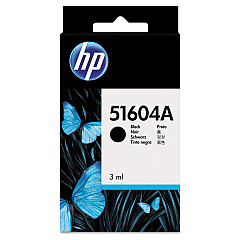





NCR 220 Tellerscan TS Financial/Bank Machines Supplies

Ads

NCR 220 Tellerscan TS Black Ink Cartridges

Ensure uninterrupted operation of your NCR 220 Tellerscan TS with our high-quality NCR 220 Tellerscan TS Ink Cartridges. These reliable cartridges are designed to deliver crisp, clear prints for all your financial document scanning needs. Choose from the original HP 51604A Black Ink Cartridge for consistent, manufacturer-approved results, or opt for the cost-effective Innovera Remanufactured Black Ink, a replacement for 51604A that offers comparable quality at a fraction of the price. Both options are compatible with your NCR 220 Tellerscan TS, guaranteeing optimal performance and longevity. Whether you're in banking, retail, or any industry requiring precise document scanning, these ink cartridges ensure your equipment operates at peak efficiency. Don't let low ink slow down your operations – stock up on NCR 220 Tellerscan TS Ink Cartridges today and keep your business running smoothly.

NCR 220 Tellerscan TS Financial/Bank Machines Supplies FAQs

  • What is the difference between HP 51604A and Innovera Remanufactured ink?

    HP 51604A is the original manufacturer's cartridge, while Innovera Remanufactured is a cost-effective alternative that offers similar quality and performance.

  • How long does a typical NCR 220 Tellerscan TS ink cartridge last?

    The lifespan of an ink cartridge depends on usage, but typically it can last for several thousand scans.

  • Are these ink cartridges compatible with other NCR models?

    These cartridges are specifically designed for the NCR 220 Tellerscan TS. Always check your device's compatibility before purchasing.

  • How do I install the ink cartridge in my NCR 220 Tellerscan TS?

    Refer to your device's user manual for specific instructions, but generally, you'll need to open the ink compartment, remove the old cartridge, and insert the new one until it clicks into place.

  • Can I use third-party ink cartridges in my NCR 220 Tellerscan TS?

    While third-party cartridges may work, we recommend using either the original HP or the Innovera Remanufactured cartridges for optimal performance and to avoid potential damage to your device.

  • How should I store unused ink cartridges?

    Store unused cartridges in a cool, dry place, away from direct sunlight. Keep them in their original packaging until ready to use.

  • What should I do if the ink cartridge is not recognized by the device?

    Try removing and reinserting the cartridge. If the problem persists, clean the cartridge contacts and try again. If issues continue, contact customer support.

  • Is the Innovera Remanufactured ink cartridge environmentally friendly?

    Yes, remanufactured cartridges help reduce waste by reusing cartridge components, making them a more environmentally friendly option.

  • How can I tell when it's time to replace my ink cartridge?

    Your device should alert you when ink levels are low. You may also notice a decrease in print quality or faded text when it's time to replace the cartridge.

  • Do you offer bulk discounts for these ink cartridges?

    Yes, we offer discounts for bulk purchases. Please contact our sales team for more information on volume pricing.

Warehouse Locations

Policy & Agreement | Copyright © 1995-2026 BlueDogInk.com
