




NCR 215 Tellerscan TS Financial/Bank Machines Supplies

Ads

NCR 215 Tellerscan TS Black Ink Cartridges

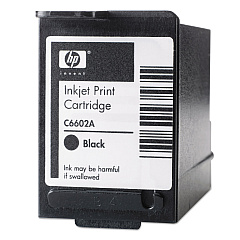
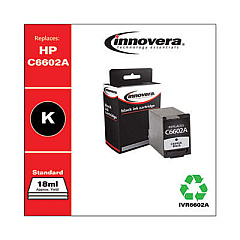
Ensure uninterrupted operation of your NCR 215 Tellerscan TS with our premium NCR 215 Tellerscan TS Ink Cartridges. These high-quality cartridges are designed to deliver crisp, clear prints for all your financial document scanning needs. Compatible options include the reliable HP C6602A Black Ink Cartridge, known for its consistent performance and long-lasting output. For a cost-effective alternative, consider the Innovera Remanufactured Black Ink, a budget-friendly option that doesn't compromise on quality. Both cartridges serve as excellent replacements for the C6602A, ensuring your NCR 215 Tellerscan TS operates at peak efficiency. Whether you're in banking, retail, or any industry requiring precise document scanning, these ink cartridges provide the dependable performance you need. Choose the right NCR 215 Tellerscan TS Ink Cartridges to maintain your equipment's optimal functionality and keep your operations running smoothly.

NCR 215 Tellerscan TS Financial/Bank Machines Supplies FAQs

  • What is the page yield of the HP C6602A Black Ink Cartridge?

    The HP C6602A Black Ink Cartridge typically yields around 18 million characters.

  • Is the Innovera Remanufactured Black Ink compatible with the NCR 215 Tellerscan TS?

    Yes, the Innovera Remanufactured Black Ink is fully compatible with the NCR 215 Tellerscan TS.

  • How often should I replace the ink cartridge in my NCR 215 Tellerscan TS?

    Replacement frequency depends on usage, but typically every 3-6 months for regular use. Always monitor print quality and replace when output becomes faded.

  • Can I use non-OEM ink cartridges in my NCR 215 Tellerscan TS?

    Yes, compatible cartridges like the Innovera Remanufactured Black Ink can be used without voiding your warranty.

  • What's the difference between the HP C6602A and the Innovera Remanufactured cartridge?

    The HP C6602A is an original equipment manufacturer (OEM) cartridge, while the Innovera is a remanufactured option that offers similar quality at a lower price point.

  • How do I install a new ink cartridge in the NCR 215 Tellerscan TS?

    Open the cartridge compartment, remove the old cartridge, insert the new one ensuring it clicks into place, and close the compartment. Refer to your device manual for specific instructions.

  • Are these ink cartridges environmentally friendly?

    The Innovera Remanufactured cartridge is more environmentally friendly as it reuses cartridge components. HP also offers a recycling program for their cartridges.

  • What should I do if I experience poor print quality with my new cartridge?

    First, ensure the cartridge is properly installed. If issues persist, run a printer head cleaning cycle. If problems continue, contact customer support.

  • Can I store unused ink cartridges for future use?

    Yes, store unopened cartridges in a cool, dry place away from direct sunlight. Use within the expiration date for best results.

  • Do you offer bulk discounts for these ink cartridges?

    Yes, we offer volume discounts for bulk purchases. Please contact our sales team for more information on bulk pricing.

Warehouse Locations

Policy & Agreement | Copyright © 1995-2026 BlueDogInk.com
