





Ads

Lanier SP C840 DN Color Toner Cartridges

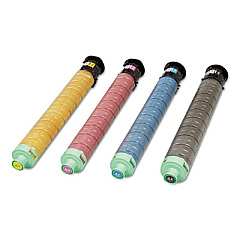
Enhance your printing experience with high-quality Lanier SP C840 DN Toner Cartridges. These premium cartridges, including the Ricoh 821258 Cyan Toner Cartridge, are designed to deliver exceptional color accuracy and sharp text for your business documents. Compatible with the Lanier SP C840 DN printer, these toner cartridges offer reliable performance and long-lasting results. Whether you're printing marketing materials, reports, or presentations, these cartridges ensure consistent output quality. With their high yield capacity, you'll enjoy fewer replacements and reduced downtime. Environmentally conscious, these cartridges are manufactured to minimize waste and energy consumption. Trust in the superior print quality and efficiency of Lanier SP C840 DN Toner Cartridges to meet your professional printing needs. Invest in these top-tier cartridges to maximize your printer's potential and achieve outstanding results every time.

Lanier SP C840 DN Toner Cartridges FAQs

  • What is the page yield of the Ricoh 821258 Cyan Toner Cartridge?

    The Ricoh 821258 Cyan Toner Cartridge typically yields around 34,000 pages at 5% coverage.

  • Are these toner cartridges compatible with other Lanier printer models?

    These cartridges are specifically designed for the Lanier SP C840 DN model. Always check your printer's compatibility before purchasing.

  • How long do these toner cartridges typically last?

    The lifespan of the cartridges depends on usage, but they generally last several months in a typical office environment.

  • Are these genuine Lanier cartridges or third-party alternatives?

    These are genuine Lanier/Ricoh toner cartridges, ensuring optimal performance and print quality.

  • Can I recycle these toner cartridges after use?

    Yes, Lanier offers a recycling program for used toner cartridges. Check their website for details on how to participate.

  • Do these cartridges come with a warranty?

    Yes, genuine Lanier toner cartridges typically come with a manufacturer's warranty. Check the packaging or contact the seller for specific warranty information.

  • How do I install these toner cartridges in my Lanier SP C840 DN printer?

    Installation is straightforward. Open the printer's front panel, remove the old cartridge, and insert the new one until it clicks into place. Refer to your printer's manual for detailed instructions.

  • Are these cartridges available in a multipack?

    Availability may vary, but many retailers offer multipack options for all four colors (cyan, magenta, yellow, and black).

  • How can I ensure the best print quality with these cartridges?

    Use genuine Lanier cartridges, store them properly, and perform regular printer maintenance as outlined in your user manual.

  • What should I do if I experience print quality issues with these cartridges?

    First, check if the cartridge is properly installed. If issues persist, run a printer cleaning cycle or contact Lanier customer support for assistance.

Warehouse Locations

Policy & Agreement | Copyright © 1995-2026 BlueDogInk.com
