





Ads

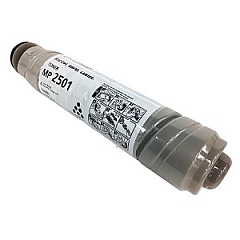
Lanier MP 2501SP Black Toner Cartridges

Enhance your office productivity with genuine Lanier MP 2501SP Toner Cartridges. These high-quality cartridges are designed specifically for the Lanier MP 2501SP multifunction printer, ensuring optimal performance and crisp, professional-grade output. The Ricoh 841768 Black Toner Cartridge, compatible with this model, delivers exceptional print quality and reliability for all your business documents. With a generous yield, these cartridges minimize downtime and reduce overall printing costs. Perfect for busy offices, schools, healthcare facilities, and government agencies, Lanier MP 2501SP Toner Cartridges provide consistent, smudge-free results page after page. Easy to install and environmentally friendly, these cartridges help maintain your printer's efficiency while reducing waste. Trust in the superior quality of Lanier toner cartridges to keep your office running smoothly and your documents looking professional.

Lanier MP 2501SP Printers Supplies FAQs

  • How long does a Lanier MP 2501SP toner cartridge typically last?

    The Ricoh 841768 Black Toner Cartridge for the Lanier MP 2501SP typically yields around 9,000 pages at 5% coverage.

  • Are these toner cartridges compatible with other Lanier printer models?

    The Ricoh 841768 Black Toner Cartridge is specifically designed for the Lanier MP 2501SP and may not be compatible with other models. Always check your printer's specifications before purchasing.

  • Can I use third-party or remanufactured toner cartridges in my Lanier MP 2501SP?

    While third-party cartridges may work, using genuine Lanier toner cartridges ensures optimal print quality and prevents potential damage to your printer.

  • How do I install a new toner cartridge in my Lanier MP 2501SP?

    To install a new cartridge, open the front cover, remove the old cartridge, unpack the new one, and insert it until it clicks into place. Close the cover to complete installation.

  • What should I do with my used toner cartridges?

    Lanier offers a recycling program for used toner cartridges. Check their website or contact your local Lanier representative for details on how to recycle your used cartridges responsibly.

  • How can I tell if my toner cartridge is running low?

    The Lanier MP 2501SP typically displays a low toner message on its control panel when the cartridge is nearing depletion. You may also notice a gradual decrease in print quality.

  • Are Lanier MP 2501SP toner cartridges available in colors other than black?

    No, the Lanier MP 2501SP is a monochrome printer, so it only uses black toner cartridges.

  • How should I store my spare toner cartridges?

    Store spare cartridges in a cool, dry place away from direct sunlight. Keep them in their original packaging until ready for use to protect them from damage and dust.

  • Can I shake the toner cartridge to extend its life?

    Gently shaking the cartridge from side to side can help redistribute toner and temporarily improve print quality, but it's not a long-term solution for a depleted cartridge.

  • What's the warranty on Lanier MP 2501SP toner cartridges?

    Genuine Lanier toner cartridges typically come with a warranty against defects in materials and workmanship. Check the packaging or contact your Lanier representative for specific warranty details.

Warehouse Locations

Policy & Agreement | Copyright © 1995-2026 BlueDogInk.com
