





Ads

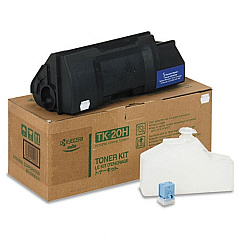
Kyocera FS-DP1400 Black Toner Cartridges

Enhance your printing experience with genuine Kyocera FS-DP1400 Toner Cartridges. These high-quality cartridges are specifically designed for the Kyocera FS-DP1400 printer, ensuring optimal performance and crisp, professional results. The Kyocera TK20H Black Toner Cartridge offers exceptional page yield and consistent output, making it an ideal choice for businesses, educational institutions, and healthcare facilities with high-volume printing needs. By using authentic Kyocera toner, you'll maximize your printer's efficiency and extend its lifespan. These cartridges are engineered to deliver sharp text and graphics while minimizing waste and environmental impact. Trust in the reliability and superior print quality of Kyocera FS-DP1400 Toner Cartridges to meet your demanding printing requirements. Invest in genuine Kyocera supplies to ensure your FS-DP1400 printer continues to produce outstanding results page after page.

Kyocera FS-DP1400 Printers Supplies FAQs

  • What is the page yield of the Kyocera TK20H Black Toner Cartridge?

    The Kyocera TK20H Black Toner Cartridge has a page yield of approximately 20,000 pages at 5% coverage.

  • Are these toner cartridges compatible with other Kyocera printer models?

    The Kyocera TK20H Black Toner Cartridge is specifically designed for the FS-DP1400 model. It may not be compatible with other Kyocera printers.

  • How can I tell if my toner cartridge is genuine?

    Genuine Kyocera toner cartridges come with a holographic security label and unique serial number. You can verify authenticity on Kyocera's official website.

  • What is the shelf life of unopened Kyocera toner cartridges?

    Unopened Kyocera toner cartridges typically have a shelf life of 1-2 years when stored in a cool, dry place away from direct sunlight.

  • Can I recycle used Kyocera toner cartridges?

    Yes, Kyocera offers a recycling program for used toner cartridges. Check their website for details on how to participate in their eco-friendly initiatives.

  • How do I install the Kyocera TK20H Black Toner Cartridge?

    To install, open the printer's front cover, remove the old cartridge, unpack the new one, and insert it until it clicks into place. Close the cover to complete installation.

  • Are there any color toner options for the Kyocera FS-DP1400?

    The Kyocera FS-DP1400 is a monochrome printer, so it only uses black toner. There are no color toner options available for this model.

  • How often should I replace the toner cartridge in my Kyocera FS-DP1400?

    Replacement frequency depends on your printing volume. Monitor print quality and replace when you notice fading or streaking, or when prompted by the printer.

  • Can I use third-party or refilled toner cartridges in my Kyocera FS-DP1400?

    While third-party options exist, using genuine Kyocera toner cartridges is recommended to ensure optimal print quality, reliability, and to maintain your printer's warranty.

  • What should I do if I experience print quality issues with my new toner cartridge?

    First, ensure the cartridge is properly installed. If issues persist, try printing a test page or cleaning the printer. If problems continue, contact Kyocera customer support for assistance.

Warehouse Locations

Policy & Agreement | Copyright © 1995-2026 BlueDogInk.com
