





Ads

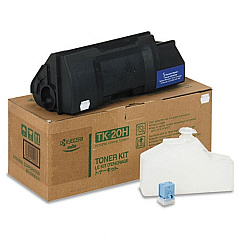
Kyocera FS-6700 Black Toner Cartridges

Enhance your printing efficiency with genuine Kyocera FS-6700 Toner Cartridges. Designed specifically for the Kyocera FS-6700 printer, these high-quality cartridges deliver exceptional print results for businesses, educational institutions, government offices, and healthcare facilities. The Kyocera TK20H Black Toner Cartridge is a key component in this lineup, offering superior yield and crisp, clear text and images. These toner cartridges are engineered to meet the demands of high-volume printing environments, ensuring consistent performance and minimal downtime. By choosing authentic Kyocera FS-6700 Toner Cartridges, you're investing in reliability and cost-effectiveness for your printing needs. Whether you're producing important documents, reports, or presentations, these cartridges provide the quality and longevity required to maintain professional standards. Trust in Kyocera's commitment to excellence and experience the difference in your print output today.

Kyocera FS-6700 Printers Supplies FAQs

  • What is the page yield of the Kyocera TK20H Black Toner Cartridge?

    The Kyocera TK20H Black Toner Cartridge typically yields approximately 20,000 pages at 5% coverage.

  • Are these toner cartridges compatible with other Kyocera printer models?

    The Kyocera FS-6700 Toner Cartridges are specifically designed for the FS-6700 model. It's best to check compatibility for other models.

  • How long do these toner cartridges typically last?

    The lifespan of the cartridges depends on usage, but under normal printing conditions, they can last several months to a year.

  • Are these genuine Kyocera toner cartridges?

    Yes, these are genuine Kyocera toner cartridges, ensuring optimal performance and print quality.

  • Can I recycle the used toner cartridges?

    Yes, Kyocera offers a recycling program for used toner cartridges. Check their website for details on how to participate.

  • Do these cartridges come with a warranty?

    Yes, genuine Kyocera toner cartridges typically come with a manufacturer's warranty. Check the packaging for specific details.

  • How do I install the toner cartridge in my Kyocera FS-6700 printer?

    Installation is straightforward. Open the printer's front cover, remove the old cartridge, and insert the new one until it clicks into place. Refer to your printer's manual for detailed instructions.

  • Are there any color toner options available for the Kyocera FS-6700?

    The Kyocera FS-6700 is a monochrome printer, so it only uses black toner cartridges.

  • How can I ensure I'm getting the best print quality with these cartridges?

    Use genuine Kyocera cartridges, maintain your printer regularly, and store the cartridges in a cool, dry place before use to ensure optimal print quality.

  • Can I buy these toner cartridges in bulk for my business?

    Yes, many suppliers offer bulk purchasing options for businesses. Contact the seller directly to inquire about bulk order discounts.

Warehouse Locations

Policy & Agreement | Copyright © 1995-2026 BlueDogInk.com
