





Ads

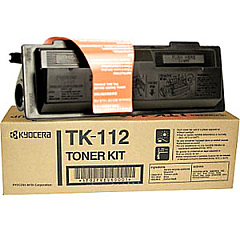
Imagistics Kyocera Mita FS-1016MFP Black Toner Cartridges

Enhance your printing experience with high-quality Imagistics Kyocera Mita FS-1016MFP Toner Cartridges. These reliable cartridges are designed specifically for the FS-1016MFP multifunction printer, ensuring optimal performance and crisp, professional results. The Kyocera TK112 Black Toner Cartridge is the perfect choice for this versatile machine, offering exceptional print quality and long-lasting output. Whether you're in a busy office, educational institution, healthcare facility, or government agency, these toner cartridges deliver consistent, high-quality prints page after page. With their superior yield and cost-effectiveness, Imagistics Kyocera Mita FS-1016MFP Toner Cartridges are an excellent choice for businesses and organizations looking to maximize their printing efficiency while minimizing costs. Trust in the reliability and performance of these genuine Kyocera toner cartridges to keep your FS-1016MFP running smoothly and producing sharp, clear documents every time.

Imagistics Kyocera Mita FS-1016MFP Printers Supplies FAQs

  • What is the page yield of the Kyocera TK112 Black Toner Cartridge?

    The Kyocera TK112 Black Toner Cartridge typically yields around 6,000 pages at 5% coverage.

  • Is the Kyocera TK112 compatible with other printer models?

    The Kyocera TK112 is specifically designed for the FS-1016MFP and may not be compatible with other printer models.

  • How long does the toner cartridge typically last?

    The lifespan of the toner cartridge depends on usage, but it generally lasts several months in a typical office environment.

  • Are these genuine Kyocera toner cartridges?

    Yes, these are genuine Kyocera toner cartridges designed for optimal performance with the FS-1016MFP.

  • Can I use third-party or remanufactured toner cartridges in the FS-1016MFP?

    While third-party cartridges may work, using genuine Kyocera toner cartridges is recommended for best results and to maintain warranty coverage.

  • How do I install the toner cartridge in the FS-1016MFP?

    Refer to the printer's user manual for step-by-step instructions on how to properly install the toner cartridge.

  • What should I do with my empty toner cartridge?

    Many office supply stores offer toner cartridge recycling programs. Check with your local retailer or Kyocera for recycling options.

  • How can I extend the life of my toner cartridge?

    To extend toner life, use draft mode for non-critical prints, print in black and white when possible, and keep the printer in a cool, dry place.

  • Does the Kyocera TK112 come with a warranty?

    Yes, genuine Kyocera toner cartridges typically come with a manufacturer's warranty. Check the packaging or contact the seller for specific warranty information.

  • How do I know when it's time to replace my toner cartridge?

    The FS-1016MFP will display a low toner warning when it's time to replace the cartridge. You may also notice a decrease in print quality.

Warehouse Locations

Policy & Agreement | Copyright © 1995-2026 BlueDogInk.com
