





Ads

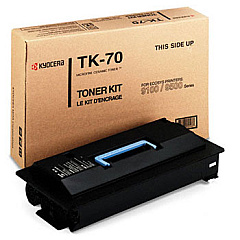
Imagistics Kyocera FS-9120DN Black Toner Cartridges

Enhance your printing efficiency with genuine Imagistics Kyocera FS-9120DN Toner Cartridges. Designed specifically for the FS-9120DN printer, these high-quality cartridges ensure crisp, professional-grade output for your business, educational institution, government office, healthcare facility, or wholesale operation. The Kyocera TK70 Black Toner Cartridge is the perfect choice for this robust printer, delivering exceptional page yield and consistent performance. By choosing authentic Imagistics Kyocera FS-9120DN Toner Cartridges, you'll maximize your printer's lifespan while minimizing downtime and maintenance costs. Experience superior print quality, reduced waste, and improved productivity with these reliable toner cartridges. Whether you're printing high-volume documents or intricate graphics, these cartridges will meet your demanding printing needs with precision and efficiency. Invest in the best for your Imagistics Kyocera FS-9120DN printer and enjoy unparalleled results.

Imagistics Kyocera FS-9120DN Printers Supplies FAQs

  • What is the page yield of the Kyocera TK70 Black Toner Cartridge?

    The Kyocera TK70 Black Toner Cartridge typically yields approximately 40,000 pages at 5% coverage.

  • Are these toner cartridges compatible with other Kyocera printer models?

    The Kyocera TK70 Black Toner Cartridge is specifically designed for the Imagistics Kyocera FS-9120DN printer. It may not be compatible with other models.

  • How long does the toner cartridge typically last?

    The lifespan of the cartridge depends on print volume and coverage, but it generally lasts several months in a typical office environment.

  • Can I use third-party or refilled toner cartridges in my Imagistics Kyocera FS-9120DN printer?

    While third-party options exist, using genuine Kyocera toner cartridges is recommended to ensure optimal print quality and prevent potential damage to your printer.

  • How do I install the Kyocera TK70 Black Toner Cartridge?

    Installation is straightforward. Open the printer's front cover, remove the old cartridge, and insert the new one until it clicks into place. Detailed instructions are provided in the printer's manual.

  • What should I do with my empty toner cartridge?

    Kyocera offers a recycling program for empty toner cartridges. You can also check with local recycling centers or office supply stores for recycling options.

  • How can I extend the life of my toner cartridge?

    To extend cartridge life, use draft mode for internal documents, print in black and white when possible, and ensure your printer firmware is up to date.

  • Does the Kyocera TK70 Black Toner Cartridge come with a warranty?

    Yes, genuine Kyocera toner cartridges typically come with a manufacturer's warranty against defects in materials and workmanship.

  • Can I store extra toner cartridges for future use?

    Yes, you can store unopened toner cartridges for future use. Keep them in a cool, dry place away from direct sunlight and extreme temperatures.

  • How do I know when it's time to replace my toner cartridge?

    Your printer will typically display a low toner warning. You may also notice a decrease in print quality or faded text, indicating it's time for a replacement.

Warehouse Locations

Policy & Agreement | Copyright © 1995-2026 BlueDogInk.com
