









Ads

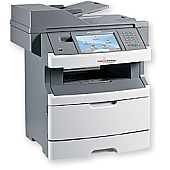
IBM InfoPrint 1940 MFP Copy Paper

Ensure uninterrupted productivity with genuine IBM InfoPrint 1940 MFP Toner Cartridges. These high-quality consumables are specifically designed for the IBM InfoPrint 1940 MFP, delivering exceptional print quality and reliability. The IBM 39V3207 Photoconductor is a key component, ensuring crisp, clear images and text throughout its extended lifespan. These toner cartridges offer excellent page yields, reducing the frequency of replacements and minimizing downtime. Perfect for businesses, educational institutions, government offices, healthcare facilities, and wholesale operations, these cartridges provide consistent, professional results. They're engineered to work seamlessly with your IBM InfoPrint 1940 MFP, preventing potential damage to your printer and maintaining its optimal performance. By choosing authentic IBM supplies, you're investing in superior print quality, reduced waste, and long-term cost savings. Trust in IBM InfoPrint 1940 MFP Toner Cartridges for all your high-volume printing needs.

IBM InfoPrint 1940 MFP Toner Cartridges FAQs

  • What is the page yield of the IBM InfoPrint 1940 MFP toner cartridge?

    The page yield varies depending on the specific cartridge model. Please check the product specifications for accurate yield information.

  • Are these toner cartridges compatible with other IBM printer models?

    These cartridges are specifically designed for the IBM InfoPrint 1940 MFP. They may not be compatible with other models.

  • How long does the IBM 39V3207 Photoconductor typically last?

    The lifespan of the photoconductor depends on usage, but it generally lasts for several thousand pages. Refer to the product specifications for exact figures.

  • Can I use third-party toner cartridges in my IBM InfoPrint 1940 MFP?

    While third-party cartridges may work, using genuine IBM cartridges ensures optimal performance and prevents potential damage to your printer.

  • How do I install the toner cartridge in my IBM InfoPrint 1940 MFP?

    Refer to your printer's user manual for step-by-step installation instructions. Generally, it involves opening the printer, removing the old cartridge, and inserting the new one.

  • What should I do with my used toner cartridges?

    IBM offers a recycling program for used cartridges. Check their website or contact customer support for details on how to participate.

  • How can I tell if my toner cartridge needs replacement?

    Your printer will typically display a low toner warning. You may also notice a decrease in print quality or faded text.

  • Are these toner cartridges environmentally friendly?

    IBM designs its cartridges with environmental considerations in mind, using recyclable materials where possible and offering recycling programs.

  • Can I buy these cartridges in bulk for my business?

    Yes, bulk purchasing options are often available for businesses. Contact the seller or IBM directly for volume pricing.

  • What's the shelf life of unused IBM InfoPrint 1940 MFP toner cartridges?

    Unopened toner cartridges typically have a shelf life of 1-2 years. Store them in a cool, dry place away from direct sunlight for best results.

Warehouse Locations

Policy & Agreement | Copyright © 1995-2026 BlueDogInk.com
