





Ads

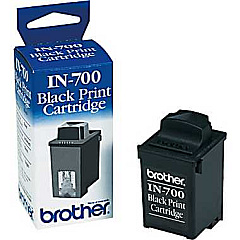
IBM ExecJet II Black Ink Cartridges

Ensure your IBM ExecJet II printer maintains its exceptional performance with genuine IBM ExecJet II Ink Cartridges. These high-quality cartridges, including the Brother IN700 Black Ink Cartridge, are designed to deliver crisp, professional-grade prints for your business, educational, governmental, or healthcare needs. Compatible with the IBM ExecJet II printer series, these cartridges offer reliable output and consistent quality, making them ideal for high-volume printing environments. With their superior ink formulation, you can expect smudge-resistant documents and vibrant colors that truly stand out. Don't compromise on quality – choose authentic IBM ExecJet II Ink Cartridges to maximize your printer's potential and achieve outstanding results every time. Whether you're printing important reports, presentations, or everyday documents, these cartridges ensure your work always looks its best.

IBM ExecJet II Ink Cartridges FAQs

  • Are IBM ExecJet II Ink Cartridges compatible with other printer models?

    No, IBM ExecJet II Ink Cartridges are specifically designed for use with IBM ExecJet II printer models only.

  • How long do IBM ExecJet II Ink Cartridges typically last?

    The lifespan of the cartridges depends on usage, but they generally last for about 500-700 pages at 5% coverage.

  • Can I use third-party ink cartridges in my IBM ExecJet II printer?

    While third-party cartridges may work, using genuine IBM cartridges ensures optimal print quality and prevents potential damage to your printer.

  • How do I install IBM ExecJet II Ink Cartridges?

    Open the printer's front cover, remove the old cartridge, and insert the new one until it clicks into place. Close the cover and follow any on-screen prompts.

  • Are IBM ExecJet II Ink Cartridges environmentally friendly?

    IBM follows environmental guidelines in manufacturing these cartridges and offers recycling programs for used cartridges.

  • How should I store unused IBM ExecJet II Ink Cartridges?

    Store cartridges in a cool, dry place away from direct sunlight. Keep them in their original packaging until ready for use.

  • What should I do if my prints are faded or streaky?

    Try cleaning the print heads using your printer's maintenance function. If the issue persists, the cartridge may need replacement.

  • Can I refill IBM ExecJet II Ink Cartridges?

    Refilling is not recommended as it may compromise print quality and potentially damage your printer. It's best to use new, genuine cartridges.

  • How do I know when it's time to replace my IBM ExecJet II Ink Cartridge?

    Your printer will typically display a low ink warning. You may also notice a decrease in print quality.

  • Are there any special handling instructions for IBM ExecJet II Ink Cartridges?

    Avoid touching the copper contacts or print head nozzles. Handle cartridges carefully to prevent damage and ensure optimal performance.

Warehouse Locations

Policy & Agreement | Copyright © 1995-2026 BlueDogInk.com
