




Ads

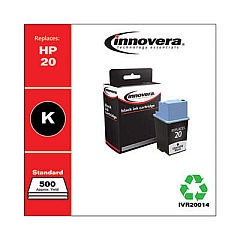
HP P-2250 Black Ink Cartridges

Ensure your HP P-2250 printer consistently delivers high-quality prints with our selection of HP P-2250 Ink Cartridges. These reliable cartridges are designed to meet the demands of businesses, educational institutions, government offices, healthcare facilities, and wholesale operations. Our range includes the cost-effective Innovera Remanufactured Black Ink, a perfect replacement for the HP 20 (C6614DN) cartridge. This eco-friendly option offers the same exceptional print quality and page yield as the original, but at a fraction of the cost. Whether you're printing important documents, reports, or presentations, these cartridges guarantee crisp text and sharp images. Don't let low ink levels disrupt your workflow – stock up on HP P-2250 Ink Cartridges today and enjoy uninterrupted, professional-quality printing for all your organizational needs.

HP P-2250 Ink Cartridges FAQs

  • Are remanufactured cartridges compatible with the HP P-2250 printer?

    Yes, remanufactured cartridges like the Innovera Remanufactured Black Ink are fully compatible with the HP P-2250 printer.

  • What is the page yield of the HP 20 (C6614DN) cartridge?

    The HP 20 (C6614DN) cartridge typically yields around 455 pages, though this may vary depending on print density and other factors.

  • How long do HP P-2250 Ink Cartridges last?

    The lifespan of the cartridges depends on usage, but they typically last several months under normal printing conditions.

  • Can I use third-party ink cartridges in my HP P-2250 printer?

    Yes, you can use third-party cartridges like the Innovera Remanufactured Black Ink, which are designed to be compatible with the HP P-2250.

  • How do I install a new ink cartridge in the HP P-2250 printer?

    To install a new cartridge, open the printer's front cover, remove the old cartridge, insert the new one until it clicks into place, and close the cover.

  • Are HP P-2250 Ink Cartridges available in colors other than black?

    The HP P-2250 primarily uses black ink cartridges. Color cartridges are not typically available for this model.

  • How can I check the ink levels in my HP P-2250 printer?

    You can check ink levels through the printer's control panel or by using the HP printer software on your computer.

  • What should I do if my HP P-2250 printer doesn't recognize the new ink cartridge?

    Try removing and reinserting the cartridge, cleaning the cartridge contacts, or updating your printer's firmware. If issues persist, contact HP support.

  • Can I recycle my used HP P-2250 Ink Cartridges?

    Yes, HP offers a recycling program for used ink cartridges. You can also check with local office supply stores for recycling options.

  • Is there a warranty on HP P-2250 Ink Cartridges?

    Original HP cartridges typically come with a warranty. For remanufactured cartridges, check with the specific manufacturer for their warranty policy.

Warehouse Locations

Policy & Agreement | Copyright © 1995-2026 BlueDogInk.com
