




Ads

HP OfficeJet V40 xi Color Ink Cartridges

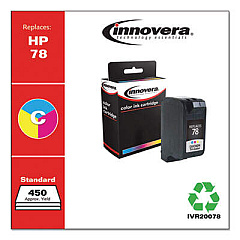
Ensure your HP OfficeJet V40 xi printer continues to deliver exceptional print quality with our range of HP OfficeJet V40 xi Ink Cartridges. These high-performance cartridges are designed to meet the demands of businesses, educational institutions, government offices, and healthcare facilities. Our selection includes the Innovera Remanufactured Tri-Color Ink, a cost-effective replacement for the original HP 78 (C6578DN) cartridge. This eco-friendly option provides vibrant, long-lasting colors for all your printing needs. Whether you're producing important documents, eye-catching presentations, or high-quality images, these cartridges deliver consistent results page after page. Don't let low ink levels slow down your productivity – stock up on HP OfficeJet V40 xi Ink Cartridges today and keep your office running smoothly. Trust in our quality products to support your printing needs and help you maintain a professional image across all your printed materials.

HP OfficeJet V40 xi Ink Cartridges FAQs

  • Are these ink cartridges compatible with my HP OfficeJet V40 xi printer?

    Yes, these ink cartridges are specifically designed for use with the HP OfficeJet V40 xi printer.

  • What is the difference between OEM and remanufactured ink cartridges?

    OEM cartridges are made by the original equipment manufacturer (HP), while remanufactured cartridges are recycled and refilled by third-party companies, often at a lower cost.

  • How long do these ink cartridges typically last?

    The lifespan of an ink cartridge depends on usage, but on average, they can print between 400-600 pages.

  • Are remanufactured ink cartridges safe for my printer?

    Yes, quality remanufactured cartridges like the Innovera brand are safe and designed to meet or exceed OEM standards.

  • Can I use these cartridges for printing photos?

    Yes, the tri-color cartridge is suitable for printing photos and color documents with good quality results.

  • How do I install the ink cartridge in my HP OfficeJet V40 xi?

    Open the printer's front cover, remove the old cartridge, insert the new one until it clicks into place, and close the cover. The printer should recognize the new cartridge automatically.

  • What should I do if my printer doesn't recognize the new cartridge?

    Try removing and reinserting the cartridge, cleaning the contacts, or running the printer's alignment process. If issues persist, contact customer support.

  • How should I store unused ink cartridges?

    Store cartridges in a cool, dry place at room temperature. Keep them in their original packaging until ready for use to prevent drying out.

  • Do you offer a warranty on these ink cartridges?

    Yes, we offer a satisfaction guarantee. If you experience any issues with the cartridges, please contact our customer service for assistance or replacement.

  • Can I recycle empty ink cartridges?

    Yes, we encourage recycling empty cartridges. Many office supply stores offer recycling programs, or you can check with local recycling centers for proper disposal methods.

Warehouse Locations

Policy & Agreement | Copyright © 1995-2026 BlueDogInk.com
