





Ads

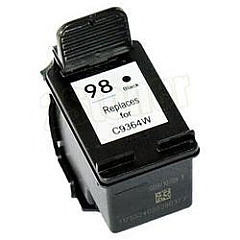
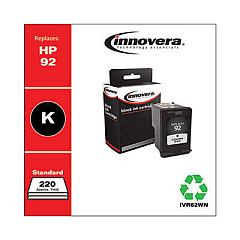
HP Officejet 6310 All-in-One Black Ink Cartridges

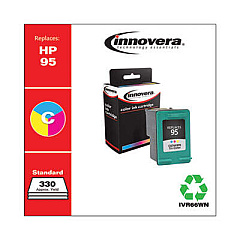
HP Officejet 6310 All-in-One Color Ink Cartridges

HP Officejet 6310 All-in-One Warranty and Services

  • HP UQ208E Exchange Warranty

    Item UQ208E

    HP UQ208E Exchange Warranty

    HP Electronic Care Pack (Next Business Day Exchange) (Hardware Support) (2 Year)..

    Status

    In Stock

    $44.99

  • HP UQ209E Exchange Warranty

    Item UQ209E

    HP UQ209E Exchange Warranty

    HP Electronic Care Pack (Next Business Day Exchange) (Enhanced Technical Phone S..

    Status

    In Stock

    $59.99

Enhance your printing experience with genuine HP Officejet 6310 All-in-One Ink Cartridges. These high-quality cartridges are designed to deliver exceptional results for your home or office printing needs. The HP C8766WN Tricolor Ink Cartridge produces vibrant, true-to-life colors, while the HP C9362WN and HP C9364WN Black Ink Cartridges offer crisp, sharp text and graphics. Compatible with your HP Officejet 6310 All-in-One printer, these cartridges ensure optimal performance and longevity. Whether you're printing important documents, stunning photos, or creative projects, these ink cartridges provide consistent, professional-quality output. With easy installation and reliable performance, HP Officejet 6310 All-in-One Ink Cartridges are the perfect choice for maintaining your printer's efficiency and producing impressive results every time you print.

HP Officejet 6310 All-in-One Printers Supplies FAQs

  • How long do HP Officejet 6310 All-in-One Ink Cartridges typically last?

    The lifespan of ink cartridges varies depending on usage, but on average, they can last for 200-300 pages for black ink and 150-200 pages for color ink.

  • Are these ink cartridges compatible with other HP printer models?

    These cartridges are specifically designed for the HP Officejet 6310 All-in-One printer. Always check your printer's compatibility before purchasing ink cartridges.

  • Can I use third-party ink cartridges in my HP Officejet 6310 All-in-One printer?

    While third-party cartridges may work, using genuine HP ink cartridges ensures the best print quality and helps maintain your printer's warranty.

  • How do I install the ink cartridges in my HP Officejet 6310 All-in-One printer?

    Open the printer's front access door, wait for the carriage to move to the center, then gently push the old cartridge up and out. Insert the new cartridge and press firmly until it clicks into place.

  • What's the difference between the HP C9362WN and HP C9364WN Black Ink Cartridges?

    The HP C9362WN is a standard capacity black ink cartridge, while the HP C9364WN is a high-capacity black ink cartridge that yields more pages.

  • How can I tell if my ink cartridges are running low?

    Your printer's software will typically alert you when ink levels are low. You can also check ink levels through the printer's control panel or by printing a test page.

  • Can I recycle my used HP ink cartridges?

    Yes, HP offers a free recycling program for used ink cartridges. You can return them to participating retailers or request a free shipping label from HP's website.

  • How should I store unused ink cartridges?

    Store unused cartridges in their original sealed packaging at room temperature, away from direct sunlight and heat sources, to maintain their quality and prevent them from drying out.

  • What should I do if my printer doesn't recognize the new ink cartridge?

    Try removing and reinserting the cartridge, ensuring it's properly seated. Clean the cartridge contacts with a lint-free cloth. If issues persist, contact HP support for assistance.

  • Can I mix different brands of ink cartridges in my HP Officejet 6310 All-in-One printer?

    It's not recommended to mix different brands of ink cartridges. Using genuine HP cartridges ensures optimal print quality and prevents potential damage to your printer.

Warehouse Locations

Policy & Agreement | Copyright © 1995-2026 BlueDogInk.com
