




Ads

HP OfficeJet 5110 xi Color Ink Cartridges

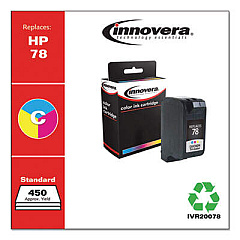
Ensure your HP OfficeJet 5110 xi printer continues to deliver high-quality prints with our selection of HP OfficeJet 5110 xi Ink Cartridges. These reliable cartridges are designed to meet the specific needs of your printer, providing crisp text and vibrant colors for all your documents and images. Our range includes the Innovera Remanufactured Tri-Color Ink, a cost-effective replacement for the HP 78 (C6578DN) cartridge. This eco-friendly option offers the same quality and page yield as the original, while helping you save money and reduce waste. Whether you're printing important business documents, school projects, or colorful photos, these ink cartridges will help you achieve professional results every time. Don't let low ink levels slow you down – stock up on HP OfficeJet 5110 xi Ink Cartridges today and keep your printer running smoothly.

HP OfficeJet 5110 xi Ink Cartridges FAQs

  • Are remanufactured ink cartridges compatible with the HP OfficeJet 5110 xi?

    Yes, remanufactured ink cartridges like the Innovera Remanufactured Tri-Color Ink are compatible with the HP OfficeJet 5110 xi.

  • What is the page yield of the HP 78 (C6578DN) ink cartridge?

    The HP 78 (C6578DN) ink cartridge typically yields around 450 pages, depending on print density and content.

  • How can I tell when my ink cartridge needs to be replaced?

    Your printer will display a low ink warning, or you may notice a decrease in print quality.

  • Is it safe to use remanufactured ink cartridges in my printer?

    Yes, high-quality remanufactured cartridges are safe to use and will not void your printer's warranty.

  • How long do ink cartridges last before they expire?

    Unopened ink cartridges typically last 1-2 years from the manufacture date. Once opened, they should be used within 6 months.

  • Can I use individual color cartridges in the HP OfficeJet 5110 xi?

    No, the HP OfficeJet 5110 xi uses a single tri-color cartridge for cyan, magenta, and yellow ink.

  • How do I install a new ink cartridge in my HP OfficeJet 5110 xi?

    Open the printer's front cover, remove the old cartridge, insert the new one, and close the cover. The printer will automatically align the new cartridge.

  • What should I do if my printer doesn't recognize the new ink cartridge?

    Try removing and reinserting the cartridge, cleaning the contacts, or running the printer's troubleshooting utility.

  • Are there any differences in print quality between original HP and remanufactured ink cartridges?

    High-quality remanufactured cartridges should provide similar print quality to original HP cartridges, though results may vary slightly.

  • Can I recycle my empty ink cartridges?

    Yes, many office supply stores and online retailers offer ink cartridge recycling programs. You can also check with your local recycling center.

Warehouse Locations

Policy & Agreement | Copyright © 1995-2026 BlueDogInk.com
