




Ads

HP OfficeJet 500 Black Ink Cartridges

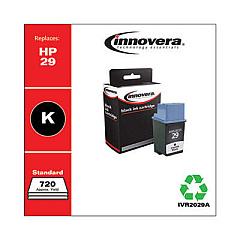
Ensure your HP OfficeJet 500 printer continues to deliver exceptional prints with our high-quality HP OfficeJet 500 Ink Cartridges. These reliable cartridges, including the Innovera Remanufactured Black Ink, Replacement for 29 (51629A), are designed to meet the demanding needs of businesses, educational institutions, government offices, and healthcare facilities. Our ink cartridges offer superior print quality, vibrant colors, and sharp text, making them ideal for professional documents, reports, and presentations. With our cost-effective solutions, you can maintain your printer's performance while reducing your printing expenses. Choose from our wide selection of genuine HP and compatible cartridges to find the perfect match for your HP OfficeJet 500. Experience hassle-free printing and consistent results with our top-notch ink cartridges, backed by our satisfaction guarantee and excellent customer support.

HP OfficeJet 500 Ink Cartridges FAQs

  • Are these ink cartridges compatible with the HP OfficeJet 500 printer?

    Yes, all the ink cartridges listed on this page are fully compatible with the HP OfficeJet 500 printer.

  • What is the difference between genuine HP and remanufactured ink cartridges?

    Genuine HP cartridges are made by HP, while remanufactured cartridges like the Innovera are recycled and refilled cartridges that offer a more cost-effective alternative.

  • How long do these ink cartridges typically last?

    The lifespan of ink cartridges varies depending on usage, but on average, they can last for 500-700 pages.

  • Do you offer a warranty on these ink cartridges?

    Yes, we offer a satisfaction guarantee on all our ink cartridges. If you're not satisfied, please contact our customer support for assistance.

  • Can I use these cartridges for other HP printer models?

    These cartridges are specifically designed for the HP OfficeJet 500. Always check your printer's compatibility before purchasing ink cartridges.

  • How do I install the ink cartridges in my HP OfficeJet 500?

    To install, open the printer's front cover, remove the old cartridge, insert the new one until it clicks into place, and close the cover. Refer to your printer's manual for detailed instructions.

  • Are these ink cartridges environmentally friendly?

    Remanufactured cartridges like the Innovera are more environmentally friendly as they reuse cartridge bodies, reducing waste. HP also offers a recycling program for their cartridges.

  • How should I store unused ink cartridges?

    Store unused cartridges in a cool, dry place, away from direct sunlight. Keep them in their original packaging until ready to use to prevent drying out.

  • Do you offer bulk discounts for these ink cartridges?

    Yes, we offer discounts for bulk purchases. Please contact our sales team for more information on volume pricing.

  • What should I do if my printer doesn't recognize the new ink cartridge?

    First, ensure the cartridge is properly installed. If the issue persists, try cleaning the cartridge contacts and resetting your printer. If problems continue, contact our customer support for further assistance.

Warehouse Locations

Policy & Agreement | Copyright © 1995-2026 BlueDogInk.com
