




Ads

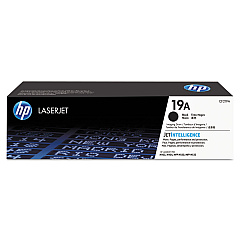
HP LaserJet Pro MFP M132fn Drum Units

Enhance your printing efficiency with genuine HP LaserJet Pro MFP M132fn Toner Cartridges. These high-quality cartridges are designed specifically for the M132fn model, ensuring optimal performance and crisp, professional results. The HP CF219A Imaging Drum is a key component, delivering sharp text and clear images for up to 12,000 pages. These toner cartridges offer reliable, streak-free printing for all your business, educational, or healthcare needs. With easy installation and long-lasting output, you'll minimize downtime and maximize productivity. Choose from a range of cartridge capacities to suit your printing volume, from standard yield to high-yield options. Trust in HP's commitment to quality and sustainability, with recycling options available for used cartridges. Invest in genuine HP LaserJet Pro MFP M132fn Toner Cartridges for consistent, professional-grade prints that make a lasting impression.

HP LaserJet Pro MFP M132fn Toner Cartridges FAQs

  • How long does the HP CF219A Imaging Drum last?

    The HP CF219A Imaging Drum typically lasts for up to 12,000 pages.

  • Are these toner cartridges compatible with other HP printers?

    These cartridges are specifically designed for the HP LaserJet Pro MFP M132fn model and may not be compatible with other printers.

  • How do I install the toner cartridge in my HP LaserJet Pro MFP M132fn?

    Installation is simple. Open the printer's front cover, remove the old cartridge, and insert the new one until it clicks into place.

  • What is the difference between standard and high-yield cartridges?

    High-yield cartridges contain more toner and can print more pages than standard cartridges, making them more cost-effective for high-volume printing.

  • Can I recycle used toner cartridges?

    Yes, HP offers a recycling program for used toner cartridges. Visit their website for details on how to participate.

  • How can I tell if my toner cartridge is genuine HP?

    Look for the HP hologram and security label on the packaging, and check the cartridge's serial number on HP's website to verify authenticity.

  • What should I do if I experience print quality issues?

    First, ensure you're using genuine HP cartridges. If issues persist, try cleaning the printer and checking for software updates.

  • How often should I replace the imaging drum?

    The imaging drum typically needs replacement after processing about 12,000 pages, but this can vary based on usage patterns.

  • Are these cartridges covered by a warranty?

    Yes, genuine HP toner cartridges come with a warranty against defects in materials and workmanship.

  • Can I use third-party or refilled cartridges in my HP LaserJet Pro MFP M132fn?

    While you can use third-party cartridges, HP recommends using genuine HP cartridges for optimal print quality and to protect your printer's warranty.

Warehouse Locations

Policy & Agreement | Copyright © 1995-2026 BlueDogInk.com
