




Ads

HP DeskJet 682 C Black Ink Cartridges

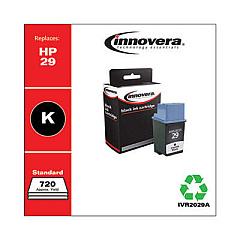
Ensure your HP DeskJet 682 C printer continues to deliver high-quality prints with our selection of HP DeskJet 682 C Ink Cartridges. These reliable cartridges are designed to provide crisp text and vibrant colors for all your printing needs. Our range includes the Innovera Remanufactured Black Ink, a cost-effective replacement for the original 29 (51629A) cartridge. This eco-friendly option offers the same quality and page yield as the OEM cartridge at a fraction of the cost. Compatible with your HP DeskJet 682 C printer, these cartridges are easy to install and guarantee consistent performance. Whether you're printing important documents or colorful graphics, our ink cartridges ensure professional results every time. Don't let low ink levels slow you down – stock up on HP DeskJet 682 C Ink Cartridges today and keep your printer running smoothly.

HP DeskJet 682 C Ink Cartridges FAQs

  • Are these ink cartridges compatible with the HP DeskJet 682 C printer?

    Yes, these ink cartridges are specifically designed for use with the HP DeskJet 682 C printer.

  • What is the difference between OEM and remanufactured cartridges?

    OEM cartridges are made by the original equipment manufacturer (HP), while remanufactured cartridges are recycled and refilled by third-party companies.

  • How many pages can I print with one cartridge?

    The page yield varies depending on the specific cartridge and printing habits, but typically ranges from 400 to 650 pages for black ink cartridges.

  • Are remanufactured cartridges as good as OEM cartridges?

    Remanufactured cartridges, like the Innovera Remanufactured Black Ink, are designed to offer similar quality and page yield as OEM cartridges at a lower cost.

  • How long do these ink cartridges last?

    Ink cartridges typically last 1-2 years if stored properly, even if they're unopened.

  • Can I use these cartridges in other HP printer models?

    These cartridges are specifically designed for the HP DeskJet 682 C. Always check compatibility before using in other models.

  • How do I install the ink cartridge in my HP DeskJet 682 C?

    Open the printer's top cover, remove the old cartridge, insert the new one until it clicks into place, and close the cover.

  • What should I do if the cartridge isn't recognized by my printer?

    Try removing and reinserting the cartridge, cleaning the contacts, or running the printer's alignment process.

  • Are these cartridges environmentally friendly?

    Remanufactured cartridges like the Innovera option are more environmentally friendly as they reuse existing cartridge shells.

  • Do you offer a warranty on these ink cartridges?

    Yes, we offer a satisfaction guarantee on all our ink cartridges. Please check our warranty policy for specific details.

Warehouse Locations

Policy & Agreement | Copyright © 1995-2026 BlueDogInk.com
