




Ads

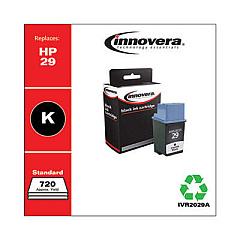
HP DeskJet 670 TV Black Ink Cartridges

Ensure uninterrupted printing with high-quality HP DeskJet 670 TV Ink Cartridges. These reliable cartridges are designed to deliver crisp text and vibrant images, making them ideal for both home and office use. Compatible with the popular HP DeskJet 670 TV printer, these cartridges offer excellent value without compromising on print quality. The Innovera Remanufactured Black Ink, a replacement for the 29 (51629A) cartridge, provides a cost-effective alternative that maintains the same high standards as the original. With these cartridges, you can expect consistent performance, reduced environmental impact, and significant savings. Whether you're printing important documents or colorful presentations, HP DeskJet 670 TV Ink Cartridges ensure your prints always look professional. Don't let low ink levels slow you down – stock up on these reliable cartridges and keep your printing tasks running smoothly.

HP DeskJet 670 TV Ink Cartridges FAQs

  • Are these cartridges compatible with other HP printers?

    These cartridges are specifically designed for the HP DeskJet 670 TV printer. Always check your printer's compatibility before purchasing.

  • How many pages can I print with one cartridge?

    Page yield varies depending on print density and content, but on average, you can expect around 650 pages per black cartridge.

  • Is the Innovera Remanufactured cartridge as good as the original HP cartridge?

    Innovera Remanufactured cartridges are designed to meet or exceed OEM standards, offering comparable quality at a lower price.

  • How long do these ink cartridges last before drying out?

    If properly stored, unopened cartridges can last up to 24 months. Once installed, it's best to use them within 6-12 months.

  • Can I recycle these ink cartridges?

    Yes, both HP original and Innovera remanufactured cartridges can be recycled through various programs.

  • Do these cartridges come with a warranty?

    Yes, Innovera Remanufactured cartridges typically come with a warranty. Check the product details for specific warranty information.

  • How do I install these ink cartridges?

    Installation is simple. Open your printer's cartridge access door, remove the old cartridge, insert the new one, and close the door. Your printer should recognize the new cartridge automatically.

  • Are these cartridges available in color options?

    This specific listing is for black ink cartridges. For color options, please check our other product listings.

  • How can I extend the life of my ink cartridges?

    To extend cartridge life, print only when necessary, use draft mode for non-critical documents, and keep your printer on to prevent the ink from drying out.

  • What should I do if my printer doesn't recognize the new cartridge?

    Try removing and reinserting the cartridge, cleaning the contacts, or running a printer alignment. If issues persist, contact customer support.

Warehouse Locations

Policy & Agreement | Copyright © 1995-2026 BlueDogInk.com
