




Ads

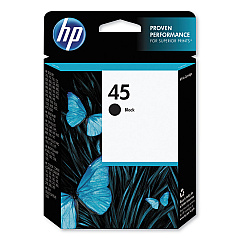
HP Designjet 750c Plus 24-in Black Ink Cartridges

Enhance your large-format printing with genuine HP Designjet 750c Plus 24-in Ink Cartridges. These high-quality cartridges are specifically designed for the HP Designjet 750c Plus 24-in printer, ensuring optimal performance and stunning results. The HP 45 Black Ink Cartridge (51645A) delivers crisp, sharp text and precise line drawings, making it ideal for architectural plans, engineering designs, and GIS maps. With its fade-resistant pigment-based ink, your prints will maintain their quality for years to come. These cartridges offer a generous page yield, reducing the frequency of replacements and minimizing downtime. Trust in HP's reliability and consistency to produce professional-grade output for your business, educational institution, or government agency. Invest in genuine HP Designjet 750c Plus 24-in Ink Cartridges to maximize your printer's potential and achieve exceptional results every time.

HP Designjet 750c Plus 24-in Printers Supplies FAQs

  • What is the page yield of the HP 45 Black Ink Cartridge (51645A)?

    The HP 45 Black Ink Cartridge (51645A) typically yields around 930 pages, depending on print density and content.

  • Are these ink cartridges compatible with other HP Designjet models?

    While the HP 45 Black Ink Cartridge (51645A) is compatible with several HP printers, it's best to check your specific model's compatibility before purchasing.

  • How long do these ink cartridges last before expiring?

    Unopened HP ink cartridges typically have a shelf life of 24 months from the date of manufacture.

  • Can I use third-party ink cartridges in my HP Designjet 750c Plus 24-in printer?

    While third-party cartridges may work, using genuine HP ink cartridges ensures the best print quality and helps maintain your printer's warranty.

  • How do I properly store unused ink cartridges?

    Store unused cartridges in their original packaging at room temperature, away from direct sunlight and heat sources.

  • What should I do if my printer doesn't recognize the new ink cartridge?

    Try removing and reinserting the cartridge, cleaning the contacts, or updating your printer's firmware. If issues persist, contact HP support.

  • Are these ink cartridges environmentally friendly?

    HP offers a recycling program for used ink cartridges, helping to reduce environmental impact.

  • How can I tell if my ink cartridge is genuine HP?

    Look for the HP hologram on the packaging and check the security label on the cartridge itself.

  • What type of ink is used in the HP 45 Black Ink Cartridge?

    The HP 45 Black Ink Cartridge uses pigment-based ink, which is known for its durability and fade resistance.

  • Can I refill these ink cartridges myself?

    HP does not recommend refilling cartridges as it may affect print quality and potentially damage your printer.

Warehouse Locations

Policy & Agreement | Copyright © 1995-2026 BlueDogInk.com
