




Ads

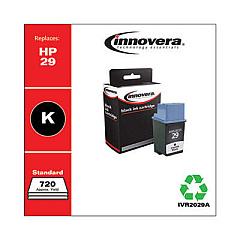
HP C2164A DeskJet 660C Black Ink Cartridges

Ensure uninterrupted printing with HP C2164A DeskJet 660C Ink Cartridges, designed for optimal performance and crisp output. These high-quality cartridges are essential for businesses, educational institutions, government offices, healthcare facilities, and wholesale operations relying on the dependable HP DeskJet 660C printer. Compatible with the Innovera Remanufactured Black Ink, a cost-effective replacement for the original 29 (51629A) cartridge, these ink supplies deliver consistent, professional results. Whether you're printing important documents, reports, or presentations, HP C2164A DeskJet 660C Ink Cartridges provide the reliability and print quality you need. With easy installation and long-lasting performance, these cartridges minimize downtime and maximize productivity. Choose genuine HP ink cartridges or trusted compatible options to keep your HP DeskJet 660C running smoothly and producing sharp, clear prints every time.

HP C2164A DeskJet 660C Ink Cartridges FAQs

  • What is the page yield for HP C2164A DeskJet 660C Ink Cartridges?

    The page yield varies depending on the specific cartridge model, but typically ranges from 400 to 650 pages for black ink cartridges.

  • Are remanufactured ink cartridges compatible with the HP DeskJet 660C?

    Yes, remanufactured cartridges like the Innovera Remanufactured Black Ink are compatible and offer a cost-effective alternative to original HP cartridges.

  • How often should I replace the ink cartridges in my HP DeskJet 660C?

    Replace cartridges when print quality diminishes or when the printer indicates low ink levels, typically every 2-3 months for average use.

  • Can I use third-party ink cartridges without voiding my printer warranty?

    Using third-party cartridges generally doesn't void the printer warranty, but HP may not cover damage directly caused by non-HP cartridges.

  • How do I install new ink cartridges in the HP DeskJet 660C?

    Open the printer's top cover, wait for the carriage to center, remove the old cartridge, insert the new one, and close the cover. The printer will automatically align the cartridge.

  • What should I do if my prints are coming out faded or streaky?

    Try cleaning the print heads using the printer's built-in cleaning function. If the problem persists, you may need to replace the ink cartridge.

  • Are HP C2164A DeskJet 660C Ink Cartridges available in color?

    The HP DeskJet 660C primarily uses black ink cartridges, but some models may support a tri-color cartridge. Check your specific printer model for compatibility.

  • How should I store unused ink cartridges?

    Store cartridges in their original sealed packaging, at room temperature, and away from direct sunlight to maintain their quality and prevent drying out.

  • Can I recycle empty HP C2164A DeskJet 660C Ink Cartridges?

    Yes, HP offers a recycling program for empty cartridges. Many office supply stores also accept cartridges for recycling.

  • What's the shelf life of unopened HP C2164A DeskJet 660C Ink Cartridges?

    Unopened cartridges typically have a shelf life of 24 months from the date of manufacture when stored properly.

Warehouse Locations

Policy & Agreement | Copyright © 1995-2026 BlueDogInk.com
