




Ads

HP 380 Black Ink Cartridges

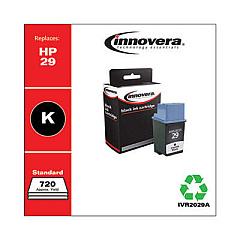
Ensure uninterrupted printing with HP 380 Ink Cartridges, designed for optimal performance in your HP 380 printer. These high-quality cartridges deliver crisp, professional-grade text and vibrant graphics, making them ideal for businesses, educational institutions, government offices, and healthcare facilities. Compatible options like the Innovera Remanufactured Black Ink, Replacement for 29 (51629A), offer cost-effective alternatives without compromising on print quality. HP 380 Ink Cartridges are engineered to work seamlessly with your printer, providing consistent results and reducing the risk of printer damage. Whether you're printing important documents, presentations, or marketing materials, these cartridges ensure your prints make a lasting impression. With easy installation and long-lasting output, HP 380 Ink Cartridges are the reliable choice for all your printing needs, from small offices to large organizations.

HP 380 Ink Cartridges FAQs

  • Are HP 380 Ink Cartridges compatible with all HP printers?

    No, HP 380 Ink Cartridges are specifically designed for use with HP 380 printers. Always check your printer model for compatibility.

  • How long do HP 380 Ink Cartridges typically last?

    The lifespan of an ink cartridge depends on usage, but on average, they can print between 200-300 pages.

  • Can I use remanufactured ink cartridges in my HP 380 printer?

    Yes, remanufactured cartridges like the Innovera Replacement for 29 (51629A) are compatible and can offer cost savings.

  • Will using remanufactured cartridges void my printer warranty?

    No, using remanufactured cartridges does not void your printer warranty under the Magnuson-Moss Warranty Act.

  • How do I install HP 380 Ink Cartridges?

    Open the printer's ink cartridge access door, remove the old cartridge, insert the new one until it clicks, and close the access door.

  • Are HP 380 Ink Cartridges recyclable?

    Yes, HP offers a recycling program for used ink cartridges. Check their website for details on how to participate.

  • How can I extend the life of my HP 380 Ink Cartridges?

    Print only when necessary, use draft mode for non-critical documents, and keep the printer's printhead clean.

  • What should I do if my printer doesn't recognize the new ink cartridge?

    Remove and reinsert the cartridge, clean the cartridge contacts, and ensure it's properly seated. If issues persist, contact HP support.

  • Can I mix original HP and remanufactured cartridges in my printer?

    Yes, you can use a combination of original HP and compatible remanufactured cartridges without issues.

  • How should I store unused HP 380 Ink Cartridges?

    Store cartridges in their original packaging, at room temperature, and away from direct sunlight to maintain their quality and extend shelf life.

Warehouse Locations

Policy & Agreement | Copyright © 1995-2026 BlueDogInk.com
