




Ads

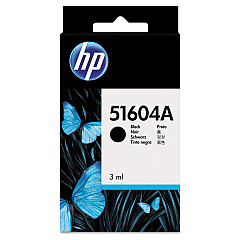
HP 2228 A QuietJet Black Ink Cartridges

Enhance your printing experience with HP 2228 A QuietJet Ink Cartridges, designed specifically for the HP 2228 A QuietJet printer. These high-quality cartridges deliver crisp, clear text and vibrant graphics for all your professional documents. The HP 51604A Black Ink Cartridge, compatible with this printer model, ensures consistent performance and long-lasting results. With its advanced formulation, this ink cartridge produces smudge-resistant prints that maintain their quality over time. HP 2228 A QuietJet Ink Cartridges are easy to install and offer reliable page yields, minimizing interruptions and maximizing productivity. Whether you're printing reports, presentations, or everyday correspondence, these cartridges provide the exceptional output you need. Trust in HP's renowned quality and compatibility to keep your QuietJet printer running smoothly and efficiently. Invest in genuine HP 2228 A QuietJet Ink Cartridges for optimal performance and professional-grade results.

HP 2228 A QuietJet Ink Cartridges FAQs

  • What is the page yield of the HP 51604A Black Ink Cartridge?

    The HP 51604A Black Ink Cartridge typically yields around 500 pages, though this may vary depending on printing habits and document types.

  • Are these ink cartridges compatible with other HP printer models?

    The HP 51604A Black Ink Cartridge is specifically designed for the HP 2228 A QuietJet printer and may not be compatible with other models. Always check your printer's compatibility before purchasing.

  • How long do HP 2228 A QuietJet Ink Cartridges last?

    The lifespan of these cartridges depends on usage, but they typically last several months under normal printing conditions.

  • Can I use third-party ink cartridges in my HP 2228 A QuietJet printer?

    While third-party cartridges may work, using genuine HP cartridges ensures optimal print quality and prevents potential damage to your printer.

  • How do I install the HP 51604A Black Ink Cartridge?

    Installation is simple: open the printer's cartridge access door, remove the old cartridge, insert the new one until it clicks into place, and close the access door.

  • Are these ink cartridges environmentally friendly?

    HP offers a recycling program for used ink cartridges, promoting environmental sustainability.

  • What should I do if my prints appear faded or streaky?

    Try cleaning the print heads using your printer's maintenance function. If the issue persists, you may need to replace the ink cartridge.

  • Can I buy these cartridges in bulk?

    Yes, many retailers offer multi-pack options for HP 2228 A QuietJet Ink Cartridges, which can be more cost-effective for high-volume users.

  • How should I store unused ink cartridges?

    Store cartridges in their original packaging at room temperature, away from direct sunlight and heat sources, to maintain their quality and extend shelf life.

  • Is there a warranty on HP 2228 A QuietJet Ink Cartridges?

    Yes, genuine HP ink cartridges come with a warranty against defects in materials and workmanship. Check the packaging or HP's website for specific warranty details.

Warehouse Locations

Policy & Agreement | Copyright © 1995-2026 BlueDogInk.com
