




Ads

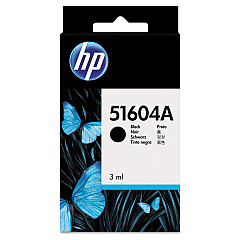
HP 2227 B QuietJet Plus Black Ink Cartridges

Ensure uninterrupted printing with genuine HP 2227 B QuietJet Plus Ink Cartridges. These high-quality cartridges are specifically designed for optimal performance in your HP 2227 B QuietJet Plus printer, delivering crisp, professional-grade text and graphics. The HP 51604A Black Ink Cartridge, compatible with this printer model, offers reliable output and exceptional value for your printing needs. Whether you're printing important business documents, educational materials, or healthcare records, these cartridges provide consistent results page after page. With their easy installation and long-lasting formula, HP 2227 B QuietJet Plus Ink Cartridges minimize downtime and maximize productivity. Trust in HP's renowned quality to keep your printer running smoothly and efficiently, ensuring that your critical printing tasks are always completed with precision and clarity.

HP 2227 B QuietJet Plus Ink Cartridges FAQs

  • How long does an HP 51604A Black Ink Cartridge typically last?

    The lifespan of an HP 51604A Black Ink Cartridge varies depending on usage, but it typically yields around 500-600 pages.

  • Is the HP 51604A Black Ink Cartridge compatible with other printer models?

    The HP 51604A Black Ink Cartridge is designed specifically for the HP 2227 B QuietJet Plus and may not be compatible with other printer models.

  • How can I tell when it's time to replace my ink cartridge?

    Your printer will typically alert you when ink levels are low. You may also notice a decrease in print quality or faded text.

  • Are there any color ink cartridges available for the HP 2227 B QuietJet Plus?

    No, the HP 2227 B QuietJet Plus is a monochrome printer and only uses black ink cartridges.

  • Can I use third-party or refilled ink cartridges in my HP 2227 B QuietJet Plus?

    While third-party cartridges may work, HP recommends using genuine HP ink cartridges for optimal print quality and to protect your printer's warranty.

  • How should I store unused ink cartridges?

    Store unused cartridges in their original packaging at room temperature, away from direct sunlight and heat sources.

  • What should I do if my printer doesn't recognize the new ink cartridge?

    Try removing and reinserting the cartridge, cleaning the contacts, or restarting your printer. If issues persist, contact HP support.

  • Is the HP 51604A Black Ink Cartridge recyclable?

    Yes, HP offers a recycling program for used ink cartridges. Visit HP's website for details on how to recycle your cartridges.

  • How can I maximize the lifespan of my ink cartridge?

    Print only when necessary, use draft mode for non-critical documents, and keep your printer maintained to ensure efficient ink usage.

  • Does using genuine HP ink cartridges affect my printer's warranty?

    Using genuine HP ink cartridges helps maintain your printer's warranty. Using non-HP cartridges may void the warranty if they cause damage to the printer.

Warehouse Locations

Policy & Agreement | Copyright © 1995-2026 BlueDogInk.com
