




Ads

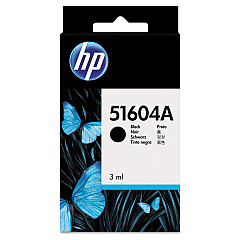
HP 2227 A QuietJet Plus Black Ink Cartridges

Ensure uninterrupted printing with genuine HP 2227 A QuietJet Plus Ink Cartridges. These high-quality cartridges are specifically designed for optimal performance in your HP 2227 A QuietJet Plus printer, delivering crisp, professional-grade text and graphics. The HP 51604A Black Ink Cartridge, compatible with this printer model, offers reliable output and exceptional value for businesses, educational institutions, and healthcare facilities. With its fade-resistant ink formulation, your documents will maintain their clarity and readability over time. These cartridges are easy to install and provide consistent, smudge-free results, making them ideal for high-volume printing environments. By choosing authentic HP 2227 A QuietJet Plus Ink Cartridges, you're investing in superior print quality and dependable performance, ensuring your printer operates at its best while minimizing downtime and waste.

HP 2227 A QuietJet Plus Ink Cartridges FAQs

  • How long does an HP 51604A Black Ink Cartridge typically last?

    The lifespan of an HP 51604A Black Ink Cartridge depends on usage, but it typically yields around 500-600 pages.

  • Are these ink cartridges compatible with other HP printer models?

    The HP 51604A Black Ink Cartridge is specifically designed for the HP 2227 A QuietJet Plus and may not be compatible with other models.

  • How can I tell if my ink cartridge is running low?

    Your printer should display a low ink warning when the cartridge is nearing depletion. You may also notice a decrease in print quality.

  • Can I use third-party ink cartridges in my HP 2227 A QuietJet Plus printer?

    While third-party cartridges may work, using genuine HP cartridges ensures optimal print quality and prevents potential damage to your printer.

  • How should I store unused ink cartridges?

    Store unused cartridges in their original packaging, at room temperature, and away from direct sunlight to maintain their quality.

  • What should I do if my printer doesn't recognize the new ink cartridge?

    Try removing and reinserting the cartridge, cleaning the contacts, or restarting your printer. If issues persist, contact HP support.

  • Is the HP 51604A Black Ink Cartridge recyclable?

    Yes, HP offers a recycling program for used ink cartridges. Visit their website for details on how to participate.

  • How can I maximize the lifespan of my ink cartridge?

    Print only when necessary, use draft mode for non-critical documents, and keep your printer maintained to optimize ink usage.

  • Does using genuine HP ink cartridges affect my printer's warranty?

    Using genuine HP ink cartridges helps maintain your printer's warranty. Third-party cartridges may void the warranty if they cause damage.

  • Can I refill the HP 51604A Black Ink Cartridge myself?

    HP does not recommend refilling cartridges as it may affect print quality and potentially damage your printer. It's best to use new, genuine cartridges.

Warehouse Locations

Policy & Agreement | Copyright © 1995-2026 BlueDogInk.com
