




Ads

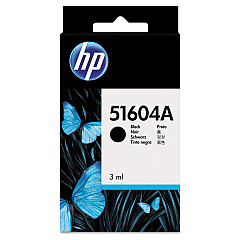
HP 2225 C ThinkJet Black Ink Cartridges

Ensure uninterrupted printing with genuine HP 2225 C ThinkJet Ink Cartridges. These high-quality cartridges are specifically designed for optimal performance in your HP 2225 C ThinkJet printer, delivering crisp, clear text and graphics. The HP 51604A Black Ink Cartridge is the perfect choice for businesses, educational institutions, and healthcare facilities that demand reliable, professional-grade output. With its long-lasting formula, you'll enjoy consistent print quality and reduced downtime. These cartridges are easy to install and compatible with a range of HP ThinkJet models, making them a versatile solution for your printing needs. Choose HP 2225 C ThinkJet Ink Cartridges for dependable results, page after page. Trust in HP's commitment to quality and environmental responsibility, and keep your printer running smoothly with these genuine ink cartridges.

HP 2225 C ThinkJet Ink Cartridges FAQs

  • What printer models are compatible with HP 2225 C ThinkJet Ink Cartridges?

    HP 2225 C ThinkJet Ink Cartridges are compatible with HP 2225 C ThinkJet printers and other HP ThinkJet models that use the HP 51604A Black Ink Cartridge.

  • How many pages can I print with one HP 51604A Black Ink Cartridge?

    The page yield varies depending on print density and content, but typically, an HP 51604A Black Ink Cartridge can print approximately 500-600 pages.

  • Are these ink cartridges genuine HP products?

    Yes, these are genuine HP ink cartridges designed specifically for HP ThinkJet printers.

  • How long do HP 2225 C ThinkJet Ink Cartridges last?

    The shelf life of unopened cartridges is typically 24 months. Once installed, it's best to use the cartridge within 6-12 months for optimal performance.

  • Can I recycle used HP 2225 C ThinkJet Ink Cartridges?

    Yes, HP offers a recycling program for used ink cartridges. You can return them to HP or participating retailers for environmentally responsible recycling.

  • How do I install the HP 51604A Black Ink Cartridge?

    Installation is simple. Open the printer's cartridge access door, remove the old cartridge, insert the new one, and close the access door. Refer to your printer's manual for specific instructions.

  • Are these cartridges refillable?

    HP does not recommend refilling these cartridges as it may affect print quality and potentially damage your printer. It's best to use new, genuine HP cartridges.

  • What should I do if my printer doesn't recognize the new cartridge?

    First, ensure the cartridge is properly installed. If the issue persists, clean the cartridge contacts and try again. If problems continue, contact HP support for assistance.

  • Can I use third-party ink cartridges instead of genuine HP ones?

    While third-party cartridges may work, using genuine HP cartridges ensures the best print quality, reliability, and printer performance. It also maintains your printer's warranty.

  • How should I store unused HP 2225 C ThinkJet Ink Cartridges?

    Store unused cartridges in their original packaging at room temperature in a dry place. Avoid extreme temperatures and direct sunlight to maintain cartridge quality.

Warehouse Locations

Policy & Agreement | Copyright © 1995-2026 BlueDogInk.com
