




Ads

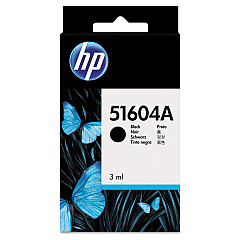
HP 2225 B ThinkJet Black Ink Cartridges

Ensure uninterrupted printing with genuine HP 2225 B ThinkJet Ink Cartridges. These high-quality cartridges are specifically designed for optimal performance in your HP 2225 B ThinkJet printer, delivering crisp, clear text and graphics. The HP 51604A Black Ink Cartridge, compatible with this printer model, offers reliable output for all your business, educational, or healthcare documentation needs. With its long-lasting formula, you'll experience fewer cartridge changes and reduced downtime. These cartridges are engineered to work seamlessly with your printer, preventing potential damage and maintaining print quality. By choosing authentic HP 2225 B ThinkJet Ink Cartridges, you're investing in consistent, professional-grade results that meet the demands of busy offices, schools, and healthcare facilities. Trust in HP's reputation for excellence and keep your ThinkJet printer running smoothly with these dependable ink cartridges.

HP 2225 B ThinkJet Ink Cartridges FAQs

  • What is the page yield of the HP 51604A Black Ink Cartridge?

    The HP 51604A Black Ink Cartridge typically yields around 500 pages, depending on print density and usage patterns.

  • Are these ink cartridges compatible with other HP printer models?

    The HP 51604A Black Ink Cartridge is specifically designed for the HP 2225 B ThinkJet printer and may not be compatible with other models.

  • How long do these ink cartridges last before expiring?

    Unopened HP ink cartridges typically have a shelf life of 24 months from the date of manufacture when stored properly.

  • Can I use third-party ink cartridges in my HP 2225 B ThinkJet printer?

    While third-party cartridges may work, using genuine HP cartridges ensures optimal print quality and prevents potential damage to your printer.

  • How do I install the HP 51604A Black Ink Cartridge?

    To install, open the printer's cartridge access door, remove the old cartridge, insert the new one, and close the access door. Refer to your printer's manual for detailed instructions.

  • Are these ink cartridges environmentally friendly?

    HP offers a recycling program for used ink cartridges, helping to reduce environmental impact. Check HP's website for details on their recycling initiatives.

  • What should I do if the ink cartridge is not recognized by my printer?

    Try removing and reinserting the cartridge, cleaning the contacts, or updating your printer's firmware. If issues persist, contact HP support for assistance.

  • Can I refill these ink cartridges?

    HP does not recommend refilling ink cartridges as it may affect print quality and potentially damage your printer. It's best to use new, genuine HP cartridges.

  • How can I check the ink levels in my HP 2225 B ThinkJet printer?

    The HP 2225 B ThinkJet printer may not have an electronic ink level indicator. Monitor print quality and replace the cartridge when output becomes faint or streaky.

  • Is there a warranty on these ink cartridges?

    Yes, HP typically offers a warranty on their ink cartridges. Check the packaging or HP's website for specific warranty information and terms.

Warehouse Locations

Policy & Agreement | Copyright © 1995-2026 BlueDogInk.com
